

|
At a Glance |
|
|
Catalog |
System |
|
Category |
Database Appliances |
|
User volumes |
yes |
|
Min. memory |
288 MB |
|
OS |
Linux |
|
Constraints |
no |
ORACLE is a database appliance based on the Oracle Database Server 10g R2 Express Edition (http://www.oracle.com/technetwork/database/express-edition/overview/index.html). It provides an easy way to add a database to any application. ORACLE is an entry-level, small-footprint database that's free to develop, deploy, and distribute; and simple to administer. Oracle Database XE is a great starter database for:
With Oracle Database XE, you can now develop and deploy applications with a powerful, proven, industry-leading infrastructure, and then upgrade when necessary without costly and complex migrations.
ORACLE stores the database on an application-defined volume that can be configured on each ORACLE instance. ORACLE creates an empty database instance when it starts on an empty volume. The ORACLE database volume cannot be shared among multiple ORACLE instances (one database volume per ORACLE instance).
ORALCE clients access the configured database through the in terminal. The database requests are processed and completed back through the same terminal. ORACLE allows any valid Oracle user to access the database through the in terminal (the appliance has two preconfigured superuser roles: standard 'SYSTEM' and 'SYS'). ORACLE can be configured with the maximum number of concurrent connections supported through in.
ORACLE also has the ability to maintain a database log accessible through the log terminal. The log is useful for tracking database information and error logging. In addition, various database statistics and debugging information may also be enabled to help with profiling database access patterns and diagnosing problems/errors.
|
Name |
Latest Version |
OS |
ORACLE |
Notes |
|
ORACLE |
1.0.1-1 |
CentOS 5.5 |
10g R2 XE |
|
Resources
|
Resource |
Minimum |
Maximum |
Default |
|
CPU |
0.1 |
4 |
0.4 |
|
Memory |
288 MB |
4G |
512 MB |
|
Bandwidth |
1 Mbps |
2 Gbps |
250 Mbps |
Notes:
ORACLE can be started with any system resources, but XE will store up to 4GB of user data, use up to 1GB of memory, and use one CPU on the host appliance.
Terminals
|
Name |
Direction |
Protocol |
Description |
|
in |
in |
Any |
Receives Oracle database requests from clients. |
|
ui |
in |
HTTP |
Receives Oracle Web GUI requests from clients. |
|
log |
out |
CIFS |
Used to access a remote file system for storing error logs. This terminal may be left unconnected if not used. |
|
mon |
out |
CCE |
Sends performance and resource usage statistics. This terminal may be left unconnected. |
The default interface is enabled. It is intended for diagnostics and troubleshooting (over SSH). Future versions of this appliance may disable SSH access.
Volumes
|
Volume |
Description |
|
data |
Volume for the database data storage. |
|
swap |
Volume for the SWAP-memory storage. |
Notes:
The swap volume must exclusively dedicated to the ORACLE instance (cannot be shared with other appliances). 1.5GB of size minimum.
Properties
None of the ORACLE properties are case sensitive excluding file names and paths.
|
Property Name |
Type |
Description |
|
http_port |
Integer |
Port used to access the ORACLE GUI through the ui terminal. Default: 8080 |
|
listener_port |
Integer |
Port used to access the ORACLE database through the in terminal. Default: 1521 |
|
sys_password |
String |
Oracle password for management accounts (SYS and SYSTEM). Default: manager. |
|
timezone |
String |
Specifies the time zone used in the appliance. If this property is empty, the timezone is not modified and left as-is. A list of supported time zones is available here? . Default: empty |
|
Property Name |
Type |
Description |
|
logs_enabled |
String |
Controls whether ORACLE will send its logs out the log terminal. Allowed values are on and off. If set to on, the log terminal must be connected. If this is set to off, logging is not used at all. Default: off |
Note: The ORACLE appliance will fail to start if logging is enabled and the log terminal is not connected.
Custom Counters
The ORACLE appliance reports the following custom counters through the mon terminal. These counters belong to the ORACLE counter group:
|
Counter Name |
Description |
|
Current Logons |
Number of current logons |
|
User Commits |
Total number of user commits |
|
User Calls |
Total number of user calls |
|
User Rollbacks |
Total number of user rollbacks |
|
Physical Read Total Bytes |
Total number of physical read bytes |
|
Physical Write Total Bytes |
Total number of physical write bytes |
|
Current Opened Cursors |
Number of current opened cursors |
|
Total Transaction Rollbacks |
Total number of transaction rollbacks |
|
OS page reclaims |
Total number of OS page reclaims |
|
OS page faults |
Total number of OS page faults |
|
OS Swaps |
Total number of OS swaps |
Possible Startup Errors
In case of appliance startup failure, the following errors may be logged to the system log:
|
Error message |
|
Error: failed to mount log share. |
|
Error: size of 'data' volume must be greater than 2GB! |
|
Error: size of 'swap' volume must be greater than 1500MB! |
|
Error: vme not found. |
|
Error: failed to preconfigure ORACLE |
|
Error: failed to setup ORACLE instance |
|
Database Configuration failed. Look into logs for details |
|
Error: failed to start the Oracle. See the /var/log/appliance/log log file in ORACLE for more details on the failure |
|
Error: failed to run postconfiguration script on ORACLE |
|
Failed to set up XXX time zone. |
In cases where critical errors are encountered that may require user attention, ORACLE logs messages to the grid's dashboard as follows:
|
Message |
Description |
|
Data volume has less than 5% of free disk space. |
Data volume on the ORACLE appliance has less than 5% of free disk space. It is advised to increase the size of the volume. |
|
Data volume has less than 1% of free disk space. |
Data volume on the ORACLE appliance has less than 1% of free disk space. Immediate attention required; possible data loss may occur. |
These messages are logged only one time once the free disk space amount drops below the threshold.
Simple two-tier application (web database application)
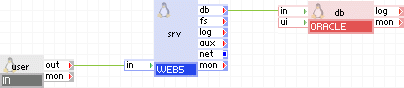
The following diagram shows a typical usage of the ORACLE appliance in a two-tier web application geared toward a lot of users executing simple queries:
Appliances in use:
Client requests arrive on the usr gateway. The gateway forwards the requests to the web server, which serves the request. When script (for example, Perl or PHP) on srv need to access persistent data, it uses the db appliance through the db terminal.
In this example, the database used with db is not read-only and many users may access it through srv executing simple queries. As such, db is configured to use 512MB of memory. Also, the database does not keep any database error log files (the log terminal is not connected).
Note: The data volume must also be configured on db and the content volume must be configured on srv. To create application volumes that can be used here, see the User Volumes online help topic.
Open source and 3rd party software used inside of the appliance
The following open source 3rd party software is used in addition to that software found on the appliance base class (LUX5 is the base class).
|
Software |
Version |
Modified |
License |
|
oracle-xe-univ |
10.2.0.1-1.0 |
No |
Oracle Corporation |
|
bc |
1.06-21 |
No |
GPLv2 |
|
libaio |
0.3.106-5 |
No |
LGPL |
|
samba-client |
3.0.33-3.29.el5_5.1 |
No |
GPLv2 |
|
samba-common |
3.0.33-3.29.el5_5.1 |
No |
GPLv2 |
|
libsmbclient |
3.0.33-3.29.el5_5.1 |
No |
GPLv2 |
|
Copyright © 2011 CA.
All rights reserved.
|
|