

|
At a Glance |
||
|
Catalog |
System |
|
|
Category |
Application Servers |
|
|
User volumes |
yes |
|
|
Min. memory |
160 MB |
|
|
OS |
Linux |
|
|
Constraints |
no |
|
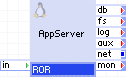
ROR is a web server appliance based on the Ruby and Ruby-on-Rails web framework. The main documentation for Ruby-on-Rails is at http://wiki.rubyonrails.org. Ruby-on-rails lets you write beautiful code by favoring convention over configuration. Ruby-on-rails can work as standalone web server or as application server.
ROR serves static web content and automatically deploys web applications from a user-configurable content volume. The paths to the documents are configurable, so that the same volume can be shared between multiple web servers and/or other appliances serving different content.
ROR can operate in two different modes: Apache/mod_passenger or Apache/mongrel_cluster. Both Rails back-ends have their own advantages, thus, Phusion Passenger provides extremely high performance for Rails applications and hot re-deploy feature, but Mongrel has a time-proven production stability in his favor.
Like WEBx servers, ROR has three generic output terminals intended for accessing external services from scripts on the content volume. The db terminal is used for accessing a various databases; the fs terminal is used for accessing shared file storage (using NFS); and the aux terminal is created for sending e-mail messages to an SMTP server.
The log terminal should be used to connect ROR to a shared file system where ROR can store log files.
Configuration of the server is defined using various properties. These properties are designed to cover the most usage variants in an easy-to-configure way and in most cases only a few need to be set to a non-default values.
|
Name |
Latest version |
OS |
Ruby version |
Ruby-on-Rails version |
Phusion Passenger |
Mongrel/Mongrel_Cluster |
|
ROR |
1.1.4-1 |
CentOS 5.5 |
Ruby 1.8.6 |
2.3.4 |
2.2.11 |
1.1.5/1.0.5 |
Resources
|
Resource |
Minimum |
Maximum |
Default |
|
CPU |
0.1 |
16 |
0.3 |
|
Memory |
160 MB |
32G |
512 MB |
|
Bandwidth |
1 Mbps |
2 Gbps |
250 Mbps |
Note: The amount of memory should be configured based on expected load on ROR and deployed applications' memory requirements.
Terminals
|
Name |
Direction |
Protocol |
Description |
|
in |
in |
HTTP |
Serves HTTP requests coming from web clients. Supports the HTTP/1.1 and HTTP/1.0. |
|
db |
out |
Any |
Access to a database server. Usage is defined by whatever scripts reside on the content volume (if any). This terminal may be left unconnected if not used. |
|
fs |
out |
NFS |
Access to a network file system for shared file storage, providing read/write file access over NFS. Usage is defined by whatever scripts reside on the content volume (if any). Software on the content volume 'sees' the mounted remote file system as /mnt/fs in the appliance's filesystem space. This terminal may be left unconnected if not used. The connected server must have a read/write share named /mnt/data exported over NFS. |
|
log |
out |
CIFS |
Access to a CIFS-based network file system for storing access and error logs. This terminal may be left unconnected if not used. The connected server must allow anonymous logins and have a read/write exported share named share. |
|
aux |
out |
Any |
Access to a SMTP server for sending outgoing e-mail. |
|
net |
out |
Any |
Gateway output for subnet access. |
|
mon |
out |
CCE |
Sends performance and resource usage statistics to MON appliance. |
The default interface is enabled. It is intended for diagnostics and troubleshooting (over SSH). Future versions of this appliance may disable SSH access.
User Volumes
|
Volume |
Description |
|
content |
A read-only or read/write volume for the storage of Rails applications and applications' data. This volume is only used if the content_on_fs property set to off. |
|
Property Name |
Type |
Description |
|
hostname |
String |
Host name of the website. Default: localhost |
|
admin_email |
String |
E-mail address for the server administrator. ROR uses this name to display it in automatically generated pages. Default: root@localhost |
|
app_base |
String |
Root directory for the documents. A typical structure of Rails application root directory should be created in that folder (app/, config/, db/, doc/, lib/, log/, public/, script/ and so on). If app_base is set to the empty string, the root directory of the content volume is used. The directory must be pre-existing on the content volume. Default: (empty) |
|
content_on_fs |
String |
Specifies whether the content is relative to the file system at the fs terminal or is on the content volume. Default: off (on the content volume) |
|
ror_backend |
String |
Turns the use of Apache/Mongrel_Cluster or Apache/Passenger mode. If ror_backend is set to mongrel than Mongel_Cluster backend will serve ROR applications instead of Phusion Passenger. Default: passenger |
|
ror_mode |
String |
ROR operation mode. Affects logging, database selection and other environment options. The values are: production, development. Default: production |
|
ror_port |
Integer |
Port where ROR webserver listens for incoming HTTP requests. Default: 80 |
|
timezone |
String |
Specifies the time zone used in the appliance. If this property is empty, the timezone is not modified and left as-is. A list of supported time zones is available here. Default: (empty) |
These are additional properties that do not need to be configured in usual circumstances. They can be used to tune up ROR in a non-standard environment.
|
Property Name |
Type |
Description |
|
ror_instances_per_app |
Integer |
The maximum number of application instances that may be simultaneously active for a single application. A value of 0 means that there is no limit placed on the number of instances a single application may use, that is, only the global limit of ror_rails_max_pool_size will be enforced ('Phusion Passenger' mode only; in 'Mongrel' mode 0 equals 2). Default: 0 |
|
ror_rails_use_global_queue |
String |
Turns the use of global queuing on or off. If global queuing is turned off, then Phusion Passenger will use fair load balancing. Default: off |
|
ror_rails_high_performance |
String |
By default, Phusion Passenger is compatible with mod_rewrite and most other Apache modules. However, lots of efforts are required to make it compatible. If you turn ror_rails high_performance to on, then Phusion Passenger will run a little bit faster, in return for reduced compatibility with other Apache modules. Default: off |
|
ror_rails_max_pool_size |
Integer |
The maximum number of Ruby on Rails or Rack application instances that may be simultaneously active. A larger number results in higher memory usage, but improved ability to handle concurrent HTTP clients. Effective in Passenger mode only. Default: 6 |
|
ror_rails_max_requests |
Integer |
The maximum number of requests an application instance will process. After serving that many requests, the application instance will be shut down and Phusion Passenger will restart it. A value of 0 means that there is no maximum: An application instance will thus be shut down when its idle timeout has been reached. This option is useful if your application is leaking memory. By shutting it down after a certain number of requests, all of its memory is guaranteed to be freed by the operating system. Effective in Passenger mode only. Default: 0 |
|
ror_mongrel_start_port |
Integer |
The start port number in port range used by the mongrel_cluster. Default: 3000 |
These are additional properties that should typically not need to be configured. They can be used to tune up ROR in non-standard circumstances.
|
Property Name |
Type |
Description |
|
max_connections |
Integer |
Maximum number of allowed concurrent connections. When this number is reached, new connections are still accepted, but their processing is delayed until another connection is closed. The max_connections value cannot be set to more than 256. |
|
persistent_connections |
String |
Controls whether ROR allows clients to request more than one document on the same connection. Allowed values are on, off. You may need to disable the persistent connections only if you have problems with clients that don't support HTTP/1.1 properly but don't fall back to HTTP/1.0. Default: on |
|
idle_timeout_sec |
Integer |
Timeout, in seconds, for keeping a client connection open if there is no request or response going through. This property is used only if persistent_connections is on. Keeping this timeout short helps drop forgotten connections quickly. Default: 15 |
|
data_timeout_sec |
Integer |
Timeout, in seconds, for receiving or sending more data if a data transfer has started but is not completed. Having this timeout allows ROR to drop connections that got forgotten, while still allowing delays during the transfer. Default: 300 |
|
info_level |
String |
Controls how much information ROR discloses about itself to web clients (in HTTP responses and in automatically generated pages). Allowed values are full (most info), os, minor, major, prod (least info). As a security measure, it is recommended that you disclose the minimum information. Default prod |
|
Property Name |
Type |
Description |
|
logs_enabled |
String |
Completely enables or disables logging. Default: off |
|
logs_base_dir |
String |
Directory where ROR='s logs are stored. This property has no effect if =logs_enabled is set to off. Default: / |
|
error_log_filename |
String |
Filename for the error log, relative to the file system accessible on the log terminal. The name may include directory names. For examples, see the access_log_filename. If this is set to an empty value or if logs_enabled is off, the error log is written to a file on the root filesystem of the ROR instance itself. This property has no effect if logs_enabled is set to off. Default: (empty) |
|
error_log_level |
String |
Severity level of messages to be written to the error log. Allowed values are debug, info, notice, warn, error, crit, alert and emerg. Debug writes most messages, emerg writes only emergency messages. Default: warn |
|
access_log_filename |
String |
Filename for the access log, relative to the file system accessible on the log terminal. For example, access_log. The name may include directory names, for example, /srv1_logs/access_log or /logs/srv1_access_log. If empty, access log is not created. If the directories don't exist, they will be created. This property has no effect if logs_enabled is set to off. Default: (empty) |
Notes:
In case of need in installing an extra gems, place them into app_base/gems folder. All those extra gems will be installed into the ram disk and mounted as /mnt/gems. Additionally, set ENV['GEM_HOME'] = '/mnt/gems' property in the config/enviroment.rb to make a rails-application to see this repository. The size of the disk will be calculated automatically. Remember this, when allocating memory for the appliance.
External Databases
ROR currently supports any of MySQL, PostgreSQL, Microsoft SQL Server as an external data storage for rails applications. It is only enough to correctly define an adapter and database user credentials in the rails application configuration file (database.yml).
Microsoft SQL Server is supported by using rails-sqlserver adapter project (http://rails-sqlserver.lighthouseapp.com/projects/20277-sql-server-05-adapter/tickets).
Example of the rails-sqlserver adapter configuration (application/config/database.yml):
production:
  adapter: sqlserver
  mode: odbc
dsn: Driver=FreeTDS;Server=db;Database=YOUR_DATABASE_NAME;Uid=USER_LOGIN;Pwd=USER_PASSWORD
Custom Counters
The ROR appliance reports the following custom counters through the mon terminal. These counters belong to the ROR counter group:
|
Counter Name |
Description |
|
Total hits |
Total number of hits |
|
Total bytes |
Total number of bytes |
|
Active requests |
Number of active requests |
|
Idle servers |
Number of idle servers |
|
Rails memory |
Total memory used by Rails (Passenger mode only) |
|
Rails applications |
The number of application instances that are currently alive (Passenger mode only) |
|
Active applications |
The number of application instances that are currently processing requests (Passenger mode only) |
|
Idle applications |
The number of application instances that are currently not processing requests, that is, are idle * (Passenger mode only) |
|
Rails sessions |
Shows how many HTTP clients are currently in the queue of all application Instances, waiting to be processed (Passenger mode only) |
|
Rails requests |
Indicates how many requests all Instances have served until now (Passenger mode only) |
Note: Idle application instances will be shutdown after a while, as can be specified with data_timeout_sec (unless this value is set to 0, in which case application instances are never shut down via idle time). The value of inactive equals count - active.
Possible Startup Errors
In case of appliance startup failure, the following errors may be logged into the system log:
|
Error Message |
Description |
|
ERROR: Logs are enabled, but log terminal is not connected. |
log terminal isn't connected, but logs_enabled or enable_access_log is set to yes. |
|
ERROR: Property content_on_fs is 'off' but the local content volume is missing. |
The content_on_fs is set to off, specifying that the data volume must be mounted locally, but ROR cannot mount content volume. Most probable cause is that the content volume is not formatted, or is not defined in ROR properties. |
|
ERROR: Failed to mount nfs share. |
ROR cannot mount NFS share. The probable cause is that fs is not connected or ROR was started before NAS (or whatever appliance is connected to the fs terminal) |
Dashboard Messages
|
Message |
Description |
|
Data storage has less than 5% of free disk space |
The data volume accessed through the fs terminal has less than 5% of free disk space. It is advised to increase the size of the volume. |
|
Data storage has less than 1% of free disk space |
The data volume accessed through the fs terminal has less than 1% of free disk space. Immediate attention required; possible data loss may occur. |
|
Content volume has less than 5% of free disk space |
The content volume on the appliance has less than 5% of free disk space. It is advised to increase the size of the volume. |
|
Content volume has less than 1% of free disk space |
The content volume on the appliance has less than 1% of free disk space. Immediate attention required; possible data loss may occur. |
The ROR performance may be affected when logging is turned on (logs_enabled = on. The table below contains benchmark results (specified in rps units - requests per second) performed when logs are disabled with Apache Benchmark utility that ships with Apache web server version 2.0 and 2.2. More info for ab is available on Apache website. Following settings were used for benchmarking: "bw=500M mem=2G cpu=2".
|
concurrency |
rps |
|
1 client concurrency |
1700-2100 rps |
|
10 client concurrency |
7100-7500 rps |
|
100 clients concurrency |
7700-8100 rps |
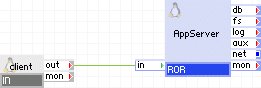
The following diagram shows a typical usage of the ROR appliance. ROR will serve applications from content volume.
Appliances in use:
|
Property Name |
Value |
Notes |
|
hostname |
www.mysite.org |
Hostname of site. |
|
app_base |
MyApp |
|
|
content_on_fs |
off |
ROR uses user volume content for all content. |
|
timezone |
EST |
EST timezone. |
|
ror_port |
80 |
Standard port for the HTTP protocol. |
Client requests arrive on the client gateway. The gateway forwards the requests to the AppServer ROR server, which serves the request.
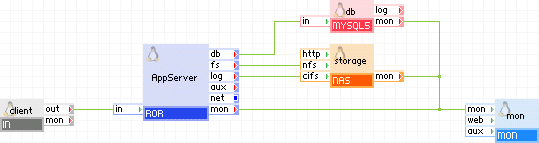
The following diagram shows a typical usage of the ROR appliance with database, log, monitoring and content on a network storage.
Appliances in use:
Example property configuration:
|
Property Name |
Value |
Notes |
|
hostname |
www.mysite.org |
Hostname of site |
|
app_base |
MyApp |
|
|
content_on_fs |
on |
ROR uses remote storage through the fs terminal for all content |
|
timezone |
EST |
EST timezone |
|
ror_port |
80 |
Standard port for HTTP protocol |
|
max_connections |
200 |
Max of 200 concurrent users |
|
logs_enabled |
yes |
Enables error logs |
|
logs_base_dir |
MyApp_Log_Dir |
|
|
error_log_level |
info |
|
|
error_log_filename |
error_log |
Error log name |
|
access_log_filename |
access_log |
Access log name |
Client request arrive on the client gateway. The gateway forwards the requests to the AppServer server, which serves the request. Content and logs are on storage appliance. Counters are reported to mon appliance.
Note: RoR applications can use many types of databases. ROR allows to connect any database appliance to its db terminal.
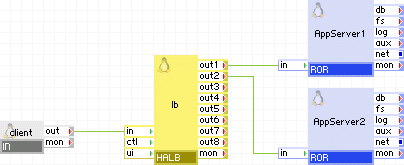
The following diagram shows a typical usage of the ROR appliance with load-balancing.
Appliances in use:
Example property configuration for both AppServer1 and AppServer2 :
|
Property Name |
Value |
Notes |
|
content_on_fs |
off |
ROR uses the user volume content for all content |
|
timezone |
EST |
EST timezone |
Others settings have their's default values.
Client request arrive on the client gateway. The gateway forwards the requests to the lb load balancer, which directs the request to one of the servers AppServer1 and AppServer2.
ROR use the following open source and 3rd party packages in addition to its base install of LUX5.
RPMs
|
Software |
Version |
Modified |
License |
|
apr |
1.2.7-11 |
No |
Apache Software License 2.0 |
|
apr-util |
1.2.7-7.el5 |
No |
Apache Software License 2.0 |
|
e2fsprogs |
1.39-20.el5 |
No |
GPLv2 |
|
e2fsprogs-libs |
1.39-20 |
No |
GPLv2 |
|
freetds |
0.64-11.el5.centos |
No |
GPLv2 |
|
glibc |
2.5-34 |
No |
LGPL |
|
glibc-common |
2.5-34 |
No |
LGPL |
|
httpd |
2.2.3-22.el5.centos |
No |
Apache Software License 2.0 |
|
keyutils-libs |
1.2-1 |
No |
LGPL |
|
krb5-libs |
1.6.1-31.el5_3.3 |
No |
MIT, freely distributable |
|
libgcc |
4.1.2-44.el5 |
No |
GPLv2 |
|
libgomp |
4.3.2-7.el5 |
No |
GPLv2 |
|
libselinux |
1.33.4-5.1.el5 |
No |
Public domain (uncopyrighted) |
|
libselinux-python |
1.33.4-5.1.el5 |
No |
Public domain (uncopyrighted) |
|
libstdc++ |
4.1.2-44.el5 |
No |
GPLv2 |
|
mailcap |
2.1.23-1.fc6 |
No |
Public domain (uncopyrighted) |
|
mysql |
5.0.45-7.el5 |
No |
GPLv2 |
|
nfs-utils |
1.0.9-40 |
No |
GPLv2 |
|
openldap |
2.3.43-3.el5 |
No |
OpenLDAP |
|
openssl |
0.9.8e-7.el5 |
No |
BSD-like |
|
perl-DBI |
1.52-2.el5 |
No |
GPL |
|
pkgconfig |
0.21-2.el5 |
No |
GPLv2 |
|
postgresql |
8.1.11-1.el5_1.1 |
No |
BSD |
|
postgresql-libs |
8.1.11-1.el5_1.1 |
No |
BSD |
|
ruby |
1.8.6.383-4 |
No |
Ruby License/GPL - see COPYING |
|
ruby-devel |
1.8.6.383-4 |
No |
Ruby License/GPL - see COPYING |
|
ruby-irb |
1.8.6.383-4 |
No |
Ruby License/GPL - see COPYING |
|
ruby-libs |
1.8.6.383-4 |
No |
Ruby License/GPL - see COPYING |
|
ruby-rdoc |
1.8.6.383-4 |
No |
Ruby License/GPL - see COPYING |
|
unixODBC |
2.2.11-7.1 |
No |
LGPL |
Installed from sources
|
Software |
Version |
Modified |
License |
|
2000-2005-adapter |
2.2.22 |
No |
MIT |
|
mysql-ruby |
2.8.2 |
No |
Ruby License |
|
rubygems |
1.3.6 |
No |
Ruby License |
GEMs
|
Software |
Version |
Modified |
License |
|
actionmailer |
2.3.4 |
No |
MIT |
|
actionpack |
2.3.4 |
No |
MIT |
|
activerecord |
2.3.4 |
No |
MIT |
|
activeresource |
2.3.4 |
No |
MIT |
|
activesupport |
2.3.4 |
No |
MIT |
|
capistrano |
2.5.9 |
No |
MIT/X Consortium License |
|
cgi_multipart_eof_fix |
2.5.0 |
No |
Ruby License |
|
daemons |
1.0.10 |
No |
Ruby License |
|
dbd-odbc |
0.2.5 |
No |
BSD |
|
dbi |
0.4.3 |
No |
BSD |
|
deprecated |
2.0.1 |
No |
BSD |
|
fastthread |
1.0.7 |
No |
Ruby License |
|
ferret |
0.11.6 |
No |
MIT/X Consortium License |
|
gem_plugin |
0.2.3 |
No |
Ruby License |
|
highline |
1.5.2 |
No |
Ruby License/GPL |
|
mongrel |
1.1.5 |
No |
Ruby License |
|
mongrel_cluster |
1.0.5 |
No |
Ruby License |
|
rake |
0.8.4 |
No |
Ruby License |
|
net-scp |
1.0.2 |
No |
Ruby License/GPL |
|
net-sftp |
2.0.3 |
No |
BSD/Ruby License |
|
net-ssh |
2.0.15 |
No |
BSD/Ruby License |
|
net-ssh-gateway |
1.0.1 |
No |
BSD/Ruby License |
|
net-ssh-multi |
1.0.1 |
No |
BSD/Ruby License |
|
passenger |
2.2.11 |
No |
GPLv2 |
|
pg |
0.8.0 |
No |
Ruby License |
|
rails |
2.3.4 |
No |
Ruby License |
|
rake |
0.8.7 |
No |
MIT/X Consortium License |
|
sqlite3-ruby |
1.2.5 |
No |
BSD |
|
Copyright © 2011 CA.
All rights reserved.
|
|