

Once the compilations you have submitted have completed successfully you can test the Edit Horse and Edit Course programs. A message is sent to your message queue when each compilation finishes.
Call your Edit Horse program from any command entry line by using the i OS CALL command to invoke your program, for example, MYAEEFR, as shown below. From within your model, you can display a command entry line by pressing F9 from the Display Services menu.
Note: If you do not know the name of your Edit Horse program, you can obtain it from the Edit Function Details panel or the Display all functions option on the Display Services Menu.
When you call your program you need to specify a dummy *Return code parameter. All CA 2E programs require a dummy parameter to be passed to the program (‘ ‘ or ‘’). This return code can be used to communicate between programs in more complex applications.
Type the program name that corresponds to your Edit Horse function and return code.
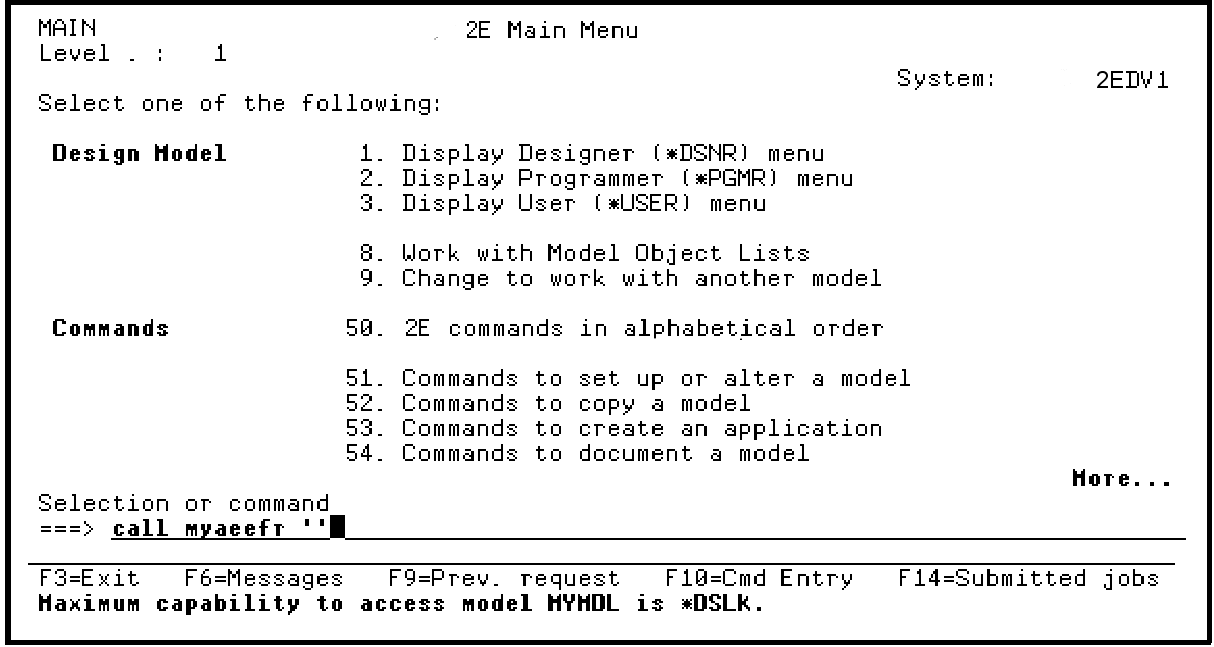
Press Enter.
Note: To test complex programs, you can use the CA 2E Call a Program (Y2CALL) command. This command loads your model and determines the parameters required by an external function directly from details contained in the model. You can provide values for all input-capable fields and you can re-use these values for subsequent calls. You can also retrieve and display output parameters when the called program ends.
|
Copyright © 2014 CA Technologies.
All rights reserved.
|
|