

This topic describes some of the Subfile selector values available for editing an action diagram. You can type ? in the Subfile selector to view a selection list of all values. Note that these Subfile selector values are sometimes referred to as commands.
Most of the Subfile selector values shown here will be demonstrated in this and the following topics. To learn about additional features of the Action Diagram Editor, refer to the online Help or the CA 2E guide, Building Applications.
Showing and hiding hidden constructs—These Subfile selector values were covered previously in this topic; this is just a review. To display a hidden construct individually use Z (zoom). To reverse the effect of the last Z you typed, use U (unzoom); to return to the topmost level, use T (top).
To hide a low level construct, use H (hide). The value H is generally used to simplify an action diagram display so it is easier to follow. To view the contents of a hidden construct, use the value S (show).
Inserting new constructs—Use the following Subfile selector values to add new constructs to an action diagram:
|
Subfile Selector Value |
Inserts |
|---|---|
|
IA |
An action |
|
IS |
A sequence of actions (Sequence construct) |
|
II |
An iteration loop (Iterative construct) |
|
IC |
A case condition (Case construct) |
|
IX |
A new condition within a Case construct |
The new construct starts on the line following the one on which the insertion was specified. Inserted constructs are initially defined in general terms. For example:
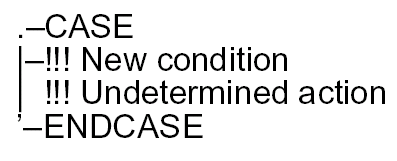
This is a generic definition of a conditional construct; where, !!! New condition indicates a conditional statement and !!! Undertermined action indicates the action to be performed if the condition is true. You can use these general structures to check the program logic. After you are sure the logic is correct, you can specify the details of the conditions and actions.
Fast paths for inserting actions—The following Subfile selector values provide fast paths that you can use to enter various actions.
|
Subfile Selector Value |
Inserts |
|---|---|
|
I* |
A comment |
|
I+ |
An *ADD built-in function |
|
I- |
A *SUB built-in function |
|
I= |
A *MOVE built-in function |
|
IM |
A Message function |
Entering construct details—You can take an additional fast path to defining the details for any of the fast path constructs/actions by appending F to the Subfile selector value (for example, IAF). Including the F causes CA 2E to display the appropriate panel where you enter details for the construct or action.
Moving and copying constructs—To move or copy a construct, type M or C in the Subfile selector of the selected construct. Type A (after) on the line above the location in the action diagram to which you want to move or copy the construct. The construct will be placed After this line. Alternatively, you can type B (before) on the line below the target location. The construct will be placed Before this line.
You can also move or copy a block of constructs using the MM (move block) or CC (copy block) commands. These commands are used in pairs; for example, type MM on the first line in the block to be moved and type another MM on the last line of the block to be moved. The entire block must be at the same construct level as indicated by the action diagram indentations. Use A (after) or B (before) as for the M and C commands.
Note: CA 2E provides a Notepad utility that lets you copy constructs from one action diagram to another. The Notepad is a temporary action diagram that serves as a work area where you can copy and append constructs from the current action diagram. Press F18 to toggle between the action diagram and the Notepad.
Deleting constructs—To delete a construct, type D against the first line of the construct. You can also use a pair of DD’s to delete a block of constructs at the same construct level.
|
Copyright © 2014 CA Technologies.
All rights reserved.
|
|