

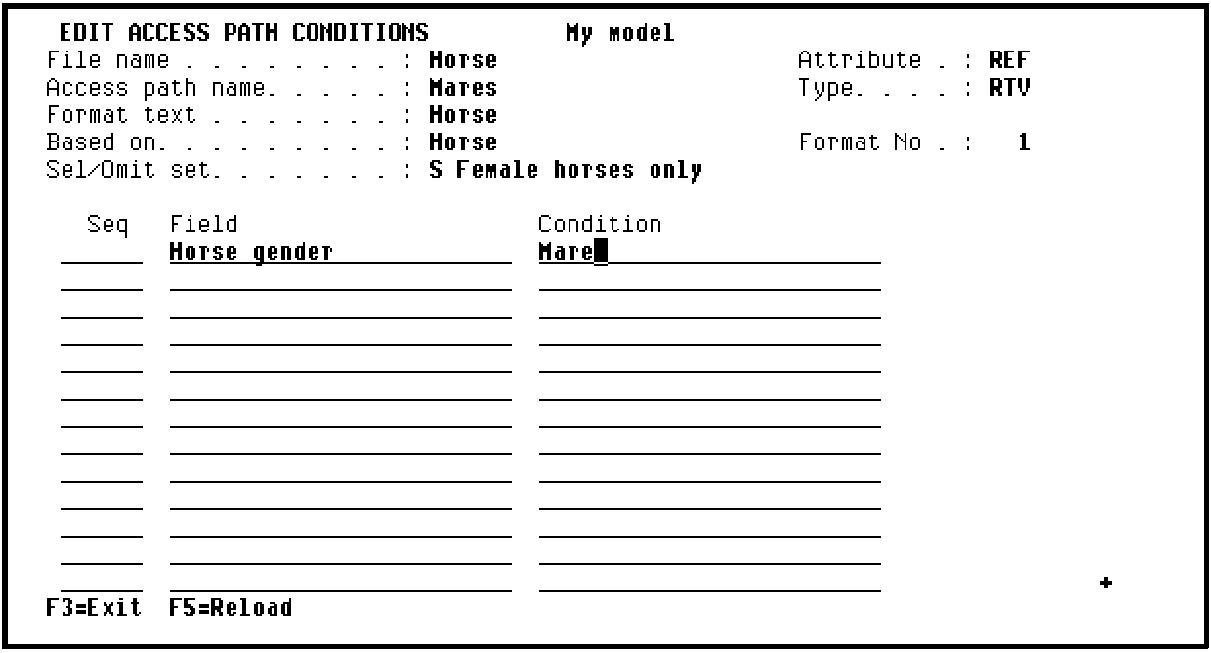
Type the conditions to be attached to the select/omit set Female horses only on this panel. In this case, the condition for the select/omit set will be based on the conditions you already specified for the Horse gender field of the HORSE file. In other words, this view of the HORSE file is to contain only records that have a value of Mare (represented by an F) for the Horse gender field. To enter this condition, type the following:
Horse gender in the Field column to specify the field on which the condition is to be based.
Mare in the condition column to indicate the value the Horse gender field must contain for the record to be selected.
Note: If you type ? in the Field column,CA 2E displays a list of the fields on the access path on which selection could be based. If you type ? in the Condition column,CA 2E displays a list of possible condition values for the associated field.
Press Enter to define the condition. The process is now complete for the selection of Mares. Press F13 (Fast exit) to return to the Edit File Details panel.
|
Copyright © 2014 CA Technologies.
All rights reserved.
|
|