

Generating and Compiling Your Application › Requesting Source Generation › Working from the Display Services Menu
Working from the Display Services Menu
The steps below give you one way to generate specific source members, starting from the Display Services Menu:
- From the Display Services Menu, display all access paths or functions; if you wish to generate:
- Access paths, choose the option Display all access paths. The Display All Access Paths panel displays.
- Functions, choose the option Display functions. The Display All Functions panel displays.
Note: For functions, ignore items with **N/A under the GEN name column. They are internal functions and will not generate. You can filter these items out of your display by typing *EXT in the Type column, so that only external functions will display.
- Request generation:
- For batch, type J beside each item you want to generate, then press Enter.
- For interactive, type G beside each item you want to generate, then press Enter.
- Exit to the Display Services Menu. Press F3 (Exit).
- Submit generations and compilations of all the source members you selected. On the Display Services Menu, you can do this in two ways:
- Select the Submit model create request (YSBMMDLCRT) option. Press Enter to display the source members you selected or press F4 to change parameter defaults before displaying the list.
- Select the Job list menu option to display the Job List Commands Menu. Select the YSBMMDLCRT option.
A job list of the source members you have requested for generation and compilation appears on the Submit Model Generations & Creates panel.
Review the list before confirming, make any changes desired, and press Enter. If the list contains items you do not want, you can drop (D) or hold (H) them. The following panel shows a sample list:
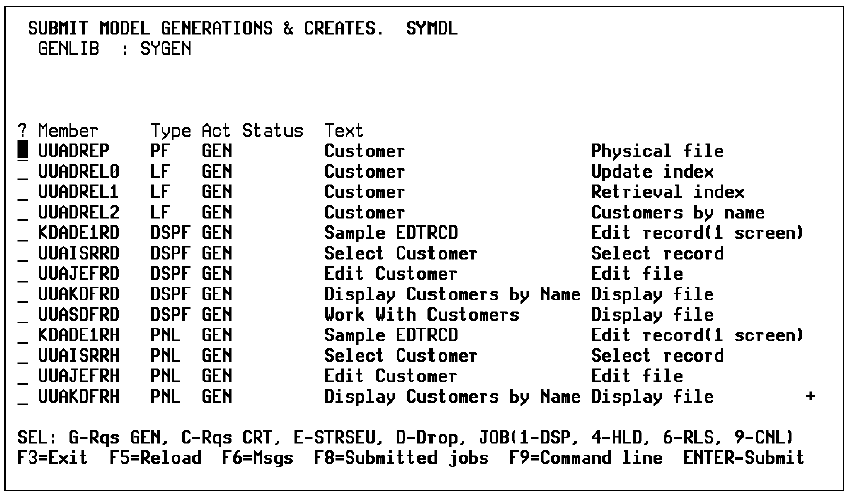
To drop or hold items:
- If you hold any part of a function, such as a program, a device, or help, you must hold all the parts.
- If you drop any part of a function, also drop the function itself. Generation will fail for a function that uses a device if you do not generate the function and device together.
After you press Enter on the Submit Model Generations & Creates panel, the panel re-displays with the confirm prompt set to Y for confirmation.
- Confirm the list. Press Enter.
CA 2E submits the generation/compilation jobs. Messages display at the bottom of the panel to let you know what work is under way, such as:
- "Job YGENSRC being prepared." YGENSRC is the generation job.
- "Existing objects are being deleted."
- "Joblist successfully processed."
- You can review the list or exit the panel for the status of members as follows:
- Refresh for the most current status by pressing F5.
- If you want to exit, press F3. This takes you to the Display Services Menu.
- To go to the i OS Work with Submitted Jobs (WRKSBMJOB) panel from the Display Services Menu, press F8.
Important! CA 2E orders generation of physical files, logical files, and functions automatically. If you disturb the order by moving dependent items among queues or deleting entries, the job may fail. The logical files must be built over physical files. Therefore, the physical files must be created first.
Each member on the job list initially has a *SBM (submitted) status. As CA 2E generates a member, the status changes to *GENSRC (source member being generated), *ACTIVE, or *JOBQ (source submitted for compilation). A source member no longer appears on the list when its compilation is completed unless the compilation fails and the status changes to *ERROR. For errors, you must resubmit both the display file and RPG or COBOL members.
For more information:
- On generating access paths, refer to Building Access Paths.
- On generating functions, refer to the chapter titled "Generating and Compiling" in Building Applications.
Copyright © 2014 CA.
All rights reserved.
|
|