

Model object lists provide a method of grouping CA 2E model objects. A model object list is a named set of references (or pointers) to model objects within a model. Each reference within a model object list is called a list entry.
Each list entry contains information about a model object at the time the list entry was created. In other words, a model object list provides an historic snapshot of a model or a group of model objects. Each list entry contains the following:
Note: Since model object lists provide an historic record, a model object list can contain list entries that see objects that have been deleted from the model.
Each model list entry also contains a flag selection value that you can set and use for filtering on model object list commands. For example, you can process only model list entries flagged as selected or just those flagged as in error.
For more information:
The following diagram illustrates the model object list and its relation to the CA 2E model.
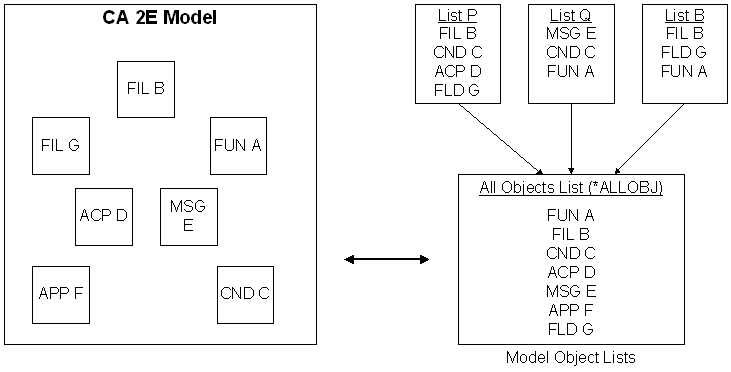
As shown in the diagram, model object lists can include model objects of different object types. You can use a model object list to group related objects into a set in the same way application areas let you group files. This enables you to manipulate or process a set of model objects with a single command or to easily process a series of tasks required as a result of a change to your model.
For example, suppose you need to change the length of a key field such as Customer number. The following list suggests a way to use model object lists to simplify the change process and ensure that all necessary tasks are done:
Note: With CM, this promotion can occur automatically; for example, to multiple remote locations.
These steps are explained in more detail throughout this chapter.
|
Copyright © 2014 CA.
All rights reserved.
|
|