

A new field, Distributed, on the Edit File Details panel, allows you to flag a CA 2E file as distributed. The field can have the following values:
This flag affects the creation of the Distributed File Configuration Table. Entries for access paths built over CA 2E files are either added (Y) or removed (N) from the table. To do this, execute the Convert Distributed Files to Configuration (YCVTDSTFIL) command.
The entries in the Distributed File Configuration Table can then be modified using the Work with Distributed Files (YWRKDSTFIL) command.
Use of these commands is described in detail later in this chapter.
Note: If you generate a program with DRDA-distributed code but compile it using the model value YGENRDB set to *NONE, the program compiles. However, at execution the program will be unable to perform the connects. Appropriate error messages will be issued. You can override the YGENRDB value for a specific program by using a compiler override to specify a different value for the RDB keyword on the i OS commands, Create SQL RPG/400 Program (CRTSQLRPG) and Create SQL COBOL/400 Program (CRTSQLCBL).
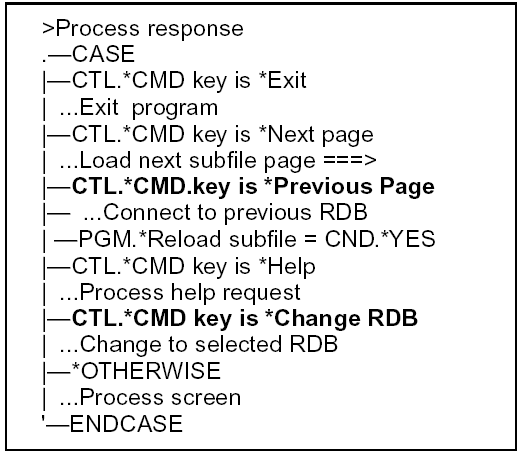
For functions to be distributed with S (CA 2E) for Distributed File I/O Control, the default action diagram of those functions will show the availability of the *Change RDB function and, depending on the function type, the *Previous page function. For example:
|
Copyright © 2014 CA.
All rights reserved.
|
|