

You can use the Display Model References panel to solve problems in program applications. Suppose you only know the implementation name of the program in which an error occurred.
Use the Edit Model Object List panel over the All Objects list (*ALLOBJ). Press F7 to display the positioning windows. Press F11 until the Position by Implementation name window displays:
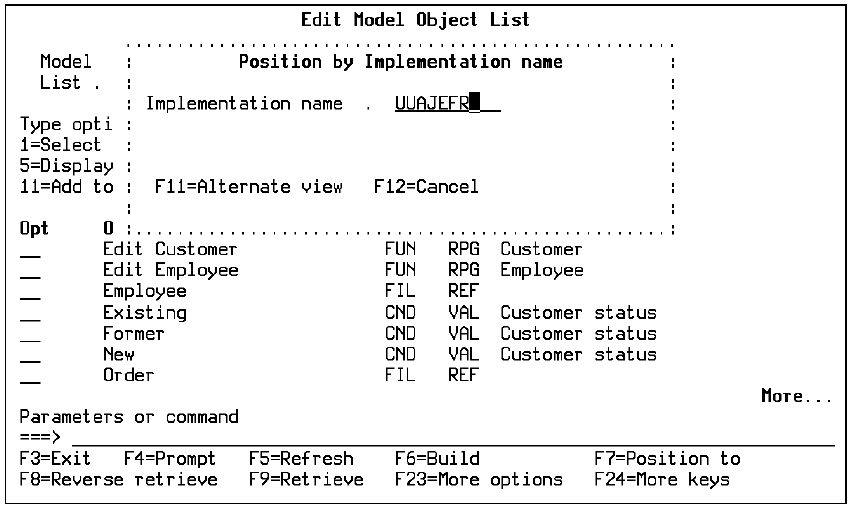
Enter the implementation name to position the All Objects list (*ALLOBJ) to the function in which the error occurred. Enter selection option 81 for the function to display references for that function. The following panel displays:
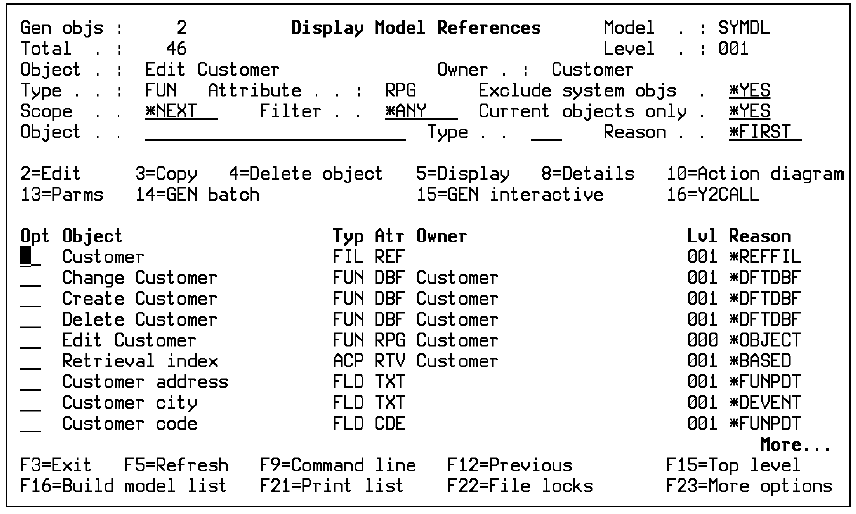
The expanded references are all the functions that comprise the program in which the error occurred. This is a useful starting place for the developers whose task it is to fix the problem.
YDOCMDLLST MDLLST(list-name)
The development staff can use either the online model object list or the printed copy as an aid to solving the problem.
|
Copyright © 2014 CA.
All rights reserved.
|
|