

Creating/Defining Your Data Model › Using CA 2E Model Management Facilities › Edit Database Relations Panel
Edit Database Relations Panel
The Edit Database Relations panel allows you to describe your data model to CA 2E. This is your starting point when creating a new data model. From here you can branch off to other areas in CA 2E.
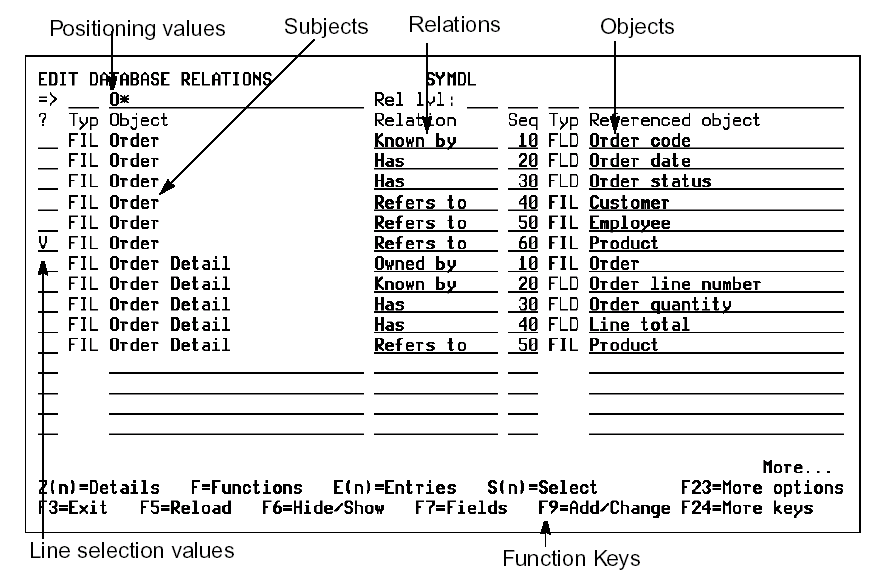
Note: Although you need to use the Edit Database Relations panel to define files and relations, you can also use the Edit Model Object List panel to handle many of the other functions provided by the Edit Database Relations panel.
At the Edit Database Relations panel, you can edit your data model, access information, or navigate through CA 2E by using:
- Line selection values to perform model-related activities:
- Add narrative text to describe your model at file, field, or relation level.
N0, N, N1—narrative for model object
N2—narrative for referenced object; field or file
N3—narrative for Refers to with Sharing Relations. Available only on relations if sharing by an access path (not *None or *All)
- Display all relations beginning with the "object" (S1) and relations that include the "referenced object" (S2).
- Display all relations referring to the "object" or all relations beginning with the next file (T1, T2).
- Virtualize (V).
- Clarify a relation with For text (+ and F5)
- Delete a relation (D).
- Specify redirection (E0).
- Go to the Edit File Entries panel (E); to the Edit Database Functions panel (F); to the Edit File Details panel (Z1 or Z); to the Edit Field Details panel (Z2).
- Function keys to define objects (F10), access online Help (Help key), the Data Dictionary (F7),CA 2E online map (F14) or CA 2E Display Services Menu (F17).
- Application areas to group your model files into specific categories under specific areas defined by a unique identification code. By specifying an application area code, you can choose to display or view only the part of the model (files) you wish, or use with documentation commands.
Note: Alternatively, you can use model object lists to group together any combination of model object types; you are not restricted to grouping files. In addition, CA 2E provides many powerful tools and commands to operate on model object lists.
Copyright © 2014 CA.
All rights reserved.
|
|