Previous Topic: Editing Device Design Function KeysNext Topic: Changing Display Length of Output-Only Entries


Modifying Field Label Text

You can modify the field details of the device using the following steps:

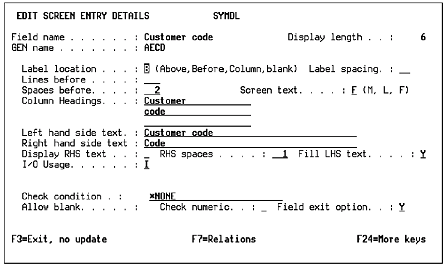
  1. View the field text details. At the device design, place the cursor on the field you want to modify and press Enter.

    The Edit Screen Entry Details panel appears.

    Modifying Field Label Text

  2. Modify the labels for the selected field.