

DBCS is used to represent ideographic characters. It is necessary to indicate when DBCS coding is being used in a string. This is done using two special characters—‘Shift in’ (Hex 0E) and ‘Shift out’ (Hex 0F). Characters lying between these are interpreted as being double byte.
For example, normally a string of the four hexadecimal codes 93, FA, 96, and 7B would code for four separate characters l, v, o, and #, respectively. Enclosed within the shift characters, they would be treated as two ideographic characters:
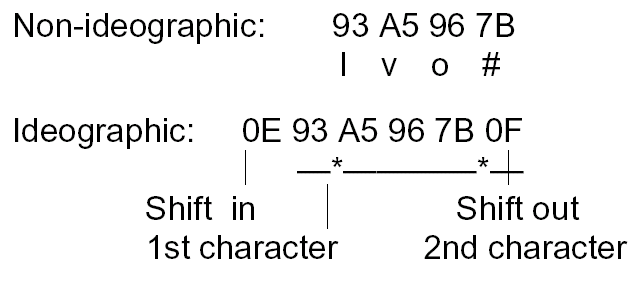
An implication for your application design is that space must be left on device files for the shift characters (one byte each), which must always be used in pairs. Furthermore, not only do DBCS characters take more space to store, but they are also physically larger on display; twice the size. However, since each character represents a whole word, fewer of them are needed.
When printing ideographic characters mixed with alphanumeric characters, you may want to ensure that the characters are of a uniform size, otherwise the mixture of large ideograms and small letters can look very untidy. There are some special facilities to do this, in particular the DDS (IGCANKCNV) keyword ideographic alphanumeric conversion.
Be careful of string manipulation. If you have any procedures which take an arbitrary string and process it, for instance to double up the apostrophes or look for a blank, a comma, or other punctuation mark, you should make sure that they ignore characters lying between the shift in and shift out characters. A code that normally represents a punctuation character may occur as part of a double byte character representing something else. For instance, 7D normally represents an apostrophe (‘), but lying within a DBCS string (for example, ‘0E 45 7D 0F’) it is part of a different code (the DBCS for the Kanji character for ‘Beauty’). You must also take care when truncating or substringing a DBCS character string. If you simply chop the end off, you may lose one of the shift characters.
Although you may use DBCS characters within message text, you may not directly add the message descriptions from the command entry program. The commands to add or change the message text should be placed in a CL member and compiled into a program. SEU provides support for IGC characters.
Data areas containing ideographic data cannot be displayed using the OS/400 Display Data area (DSPDTAARA) command.
|
Copyright © 2014 CA.
All rights reserved.
|
|