

Panel titles should use phrases of the form VERB/OBJECT whenever possible; for instance, Edit Customer, Add Order, Deplete Stock.
Use a standard layout for the panel header and footer areas (lines 1, 2 and 23). The CA 2E Toolkit Edit Panel Design (YEDTPNL) command and the CA 2E Edit Screen facility can automatically provide a standard default layout.
Use a standard flow of information and a standard layout for similar types of panel.
Place dot leaders to connect field text with fields. On iSeries, these should be double spaced and only end in a colon if the field is protected. Leave as much space as possible to allow for expansion in translation. Align fields by using a standard text length. For example:

For input fields, provide right-hand side text to explain the allowed values. This should have the form, "general domain, valuen=explanation". Indicate if a selection is available. Place the default value first as shown in the following image:
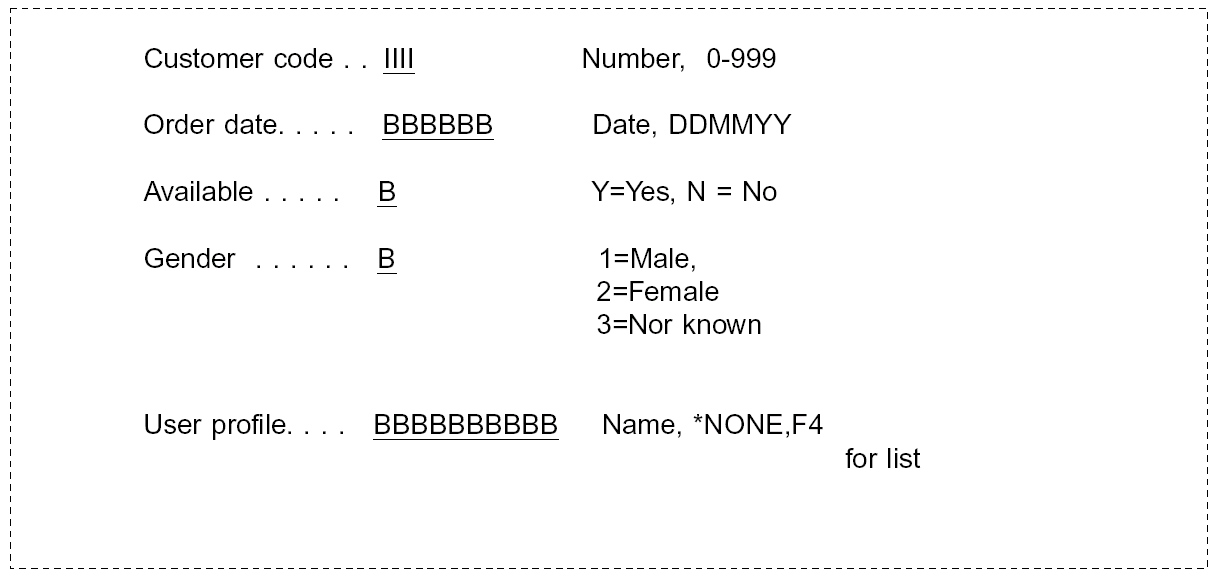
Use an indent of two spaces for subsidiary fields as shown in the following:

The overall aim is to give a greater emphasis to input-capable fields than to output-only fields, and the greatest emphasis to input-capable fields for which an error has been detected, as shown in the following example:

If the panel relates to other output, for example, a printed report, try and design so that the layouts are the same or very similar. This gives the user the effect of "what you see is what you get."
Place text giving a summary definition of command key meanings at the bottom of the display (line 23, or lines 22 and 23). Precede each key explanation with Fn=. Double-space the key explanations without punctuation. If there are more command key explanations than will fit on the available space, use F24 to display the extra values.
For example:

You may also use F11 to condition the introduction of extra detail fields.
Validation error messages should be displayed on line 24 of the display (usually as a one-line message subfile).
|
Copyright © 2014 CA.
All rights reserved.
|
|