

You should regard panels as being composed, not of the low level elements with which you define them (literal characters, fields, indicators), but rather of higher-level logical components such as a title, a command key explanation line, a subfile selector, and various fields, each with an accompanying piece of text. This makes it possible to establish equivalence, and hence consistency, between different panel types and even different types of workstation; for example, between intelligent workstation products and dumb terminals.
The generalized SAA CUA standard for panel layout for both NPT and IWS panels is as follows:
CUA Panel Layout:
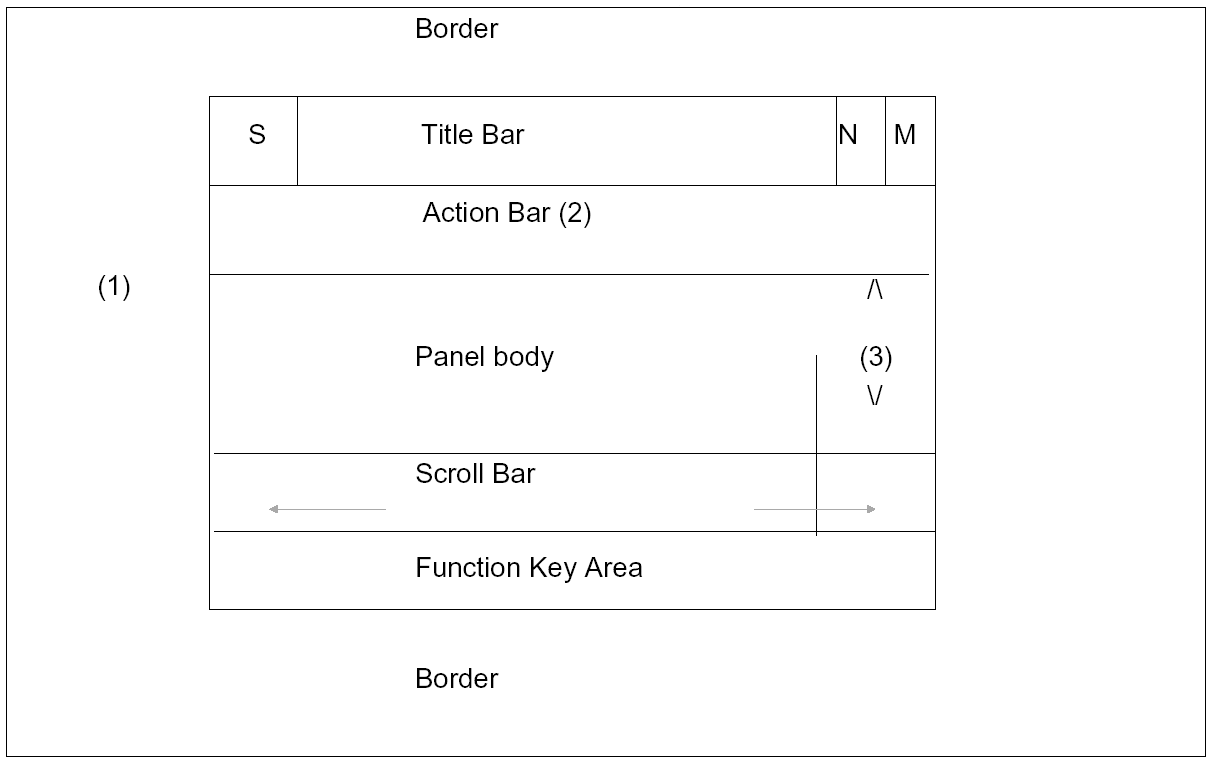
Key:(1) On non-IWS, there is no border area.
(2) On non-IWS, the action bar corresponds to selection values.
(3) On non-IWS, the vertical Scroll Bar is implemented via +.
(S) = On IWS, this area displays the System Menu.
(M) = On IWS, this area is to maximize control.
(N) = On IWS, this area is to minimize control.
The panel body is made up of instruction areas, explaining how to use the panel or data and fields. Each field may have a label and if appropriate, an explanation of the allowed values.
|
Copyright © 2014 CA.
All rights reserved.
|
|