

The CA 2E Condition (CND) context enables you to specify that a particular field condition value is to be supplied as a field value in one of the following ways:
All field conditions that are attached to a field are available in the CND context for that particular field.
The CND context is available in the action diagrams of all function types. You can use the CND context for function parameter and action diagram condition fields. However, you cannot use the CND context for result fields; that is, you cannot move another field value into a condition context field.
To use a CND context field as a parameter, you specify that the conditions attached to the field be passed as a parameter value to a result field.
To use a CND context field as a condition, you specify processing in a CASE construct if a particular field condition is attached to a field. For example, if CND *Return code is *User QUIT requested, then *Exit program.
The following example shows both uses of the CND context.
As a parameter:
The CA 2E supplied status field *Return code has several conditions attached to it; for example, *User QUIT requested. Any one of the conditions can be used as a parameter on the Edit Action - Function Details window:
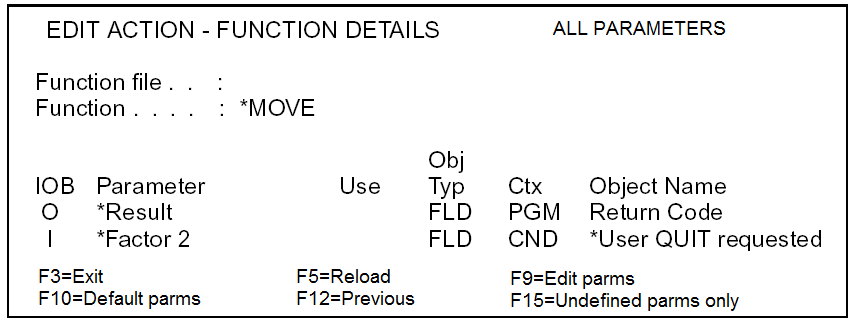
This is shown in the action diagram as:
PGM. *Return code = CND. *User QUIT request <<<
As a condition:
If *User QUIT requested is the name of a condition attached to the *Return code field, then an example of conditioning a CASE statement might be:
  .—CASE                                       <<<
  : PGM.*Return code is *User QUIT requested   <<<
  : Exit program                               <<<
  ‘—ENDCASE
|
Copyright © 2014 CA.
All rights reserved.
|
|