

The Next Report Format (NXT) context defines a context relative to the CUR context for report functions. The NXT context contains fields that are in the next active report format (not dropped format) that is one level break lower. You could use the NXT context to specify the placement of the result of a function field (SUM, MIN, MAX, or CNT) on the appropriate report total format. You can only use the NXT context for result fields.
The NXT context is only available in the action diagrams of the following function types:
For example, in a report to print out an Order: if the Order detail format contains the field, Order Line Value, and Total Order Value is a SUM function field based on this field, the same function field can be attached to two different formats:
In both cases, the instance of the input field is from the CUR context while the result field is placed on the NXT context.
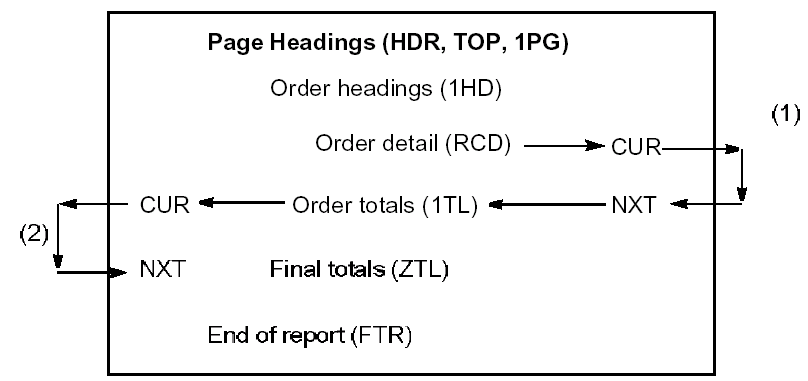
The function field is inserted into the action diagram of the report function at the points where each format is processed.
  > USER: Process Order detail
  .--                                                   <<<
  : Total order value

  :     O   Total order value  NXT   Total order value
  :     I   Order line value   CUR   Order line value

  ‘--
  > USER: Process Order no. totals
  .--                                                   <<<
  : Total order value

  :     O   Total order value  NXT   Total order value
  :     I   Order line value   CUR   Order line value

  ‘--
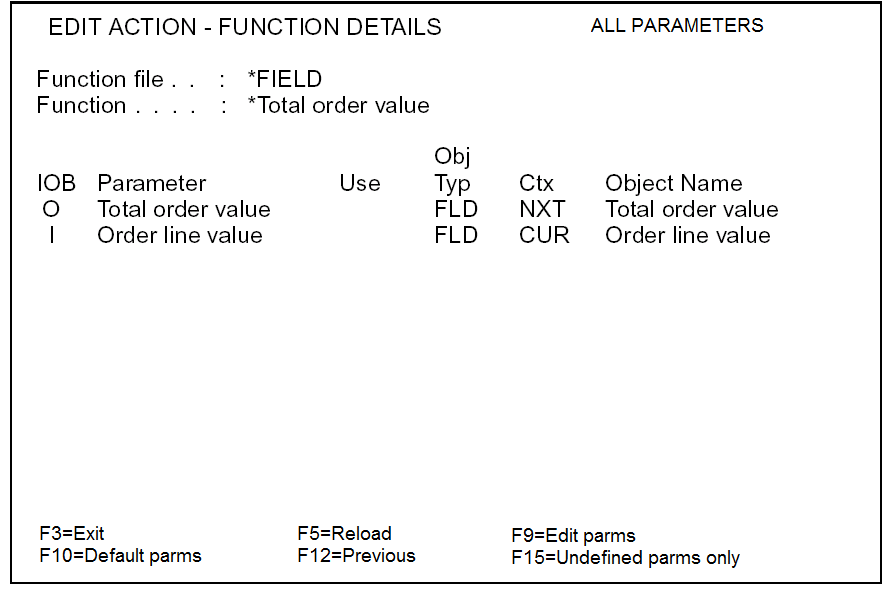
The parameters for each call to the function field can be accessed using the Edit Action - Function Details window. For example, Order Line Value is input from the CUR context and Total Order Value is output to the NXT context:
If a report format is dropped from a CA 2E report design (using the Edit Design Formats panel), the NXT context retains its meaning. Any fields in the context are automatically assumed by CA 2E to be on the next highest format level. Thus, in the previous example: if the Order Totals format was dropped, the Order Line Value function field would be assumed to total directly onto the Final totals format.
|
Copyright © 2014 CA.
All rights reserved.
|
|