

User-written trigger programs typically perform semi-generic processing to retrieve the file-specific ORF and NRF from the trigger buffer and move them into named structures prior to performing trigger-specific processing. This retrieval processing often involves relatively high complexity. Such processing can require the use of relatively esoteric functionality like pointer-based variables and dynamic memory operations not normally found in most HLL programming.
As a result of IBM’s implementation of triggers (and particularly the way in which DM passes parameters to the trigger program), developers typically write separate trigger programs for each database file. A single trigger program may be used for more than one trigger on that file, however.
This implementation also makes it difficult to test trigger programs, since any test-harness must exactly duplicate the trigger buffer parameter specific to the file to which the trigger is attached.
In addition, the actual insertion of a trigger into the database (either initially or following a change in a trigger) requires multiple file locks on the database file and on all related access paths, often requiring the database to be taken offline during trigger implementation.
The following diagram shows the structure of a typical (non-CA 2E) trigger showing how the various components interact.
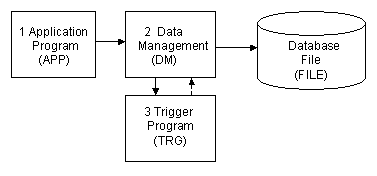
The processing flow is as follows:
|
Copyright © 2014 CA.
All rights reserved.
|
|