Maintaining Your Data Model › Adding/Modifying Conditions › Add New Conditions
Add New Conditions
When adding a condition, you must add the condition type, the meaning of the condition, and the value used to describe the condition in the file.
- From the Edit Field Conditions panel:
Type a name and a condition type (VAL, LST, CMP, or RNG) and press Enter.
The Edit Field Conditions Details panel displays.
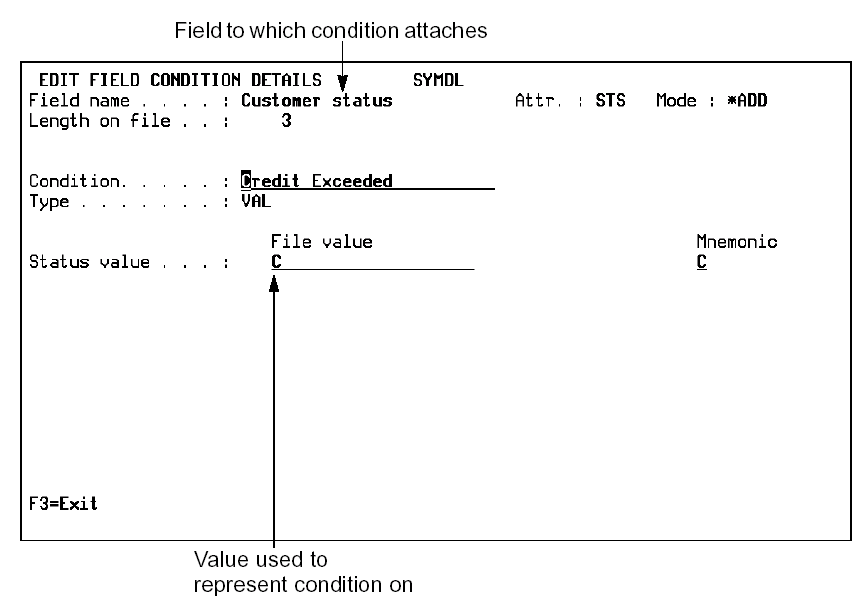
For STS fields:
- If type is VAL, and Translate condition value is Yes, enter the display and file (storage) values for the condition.
- If type is VAL, and Translate condition value is No, enter the file (storage) and mnemonic values for the condition.
- If type is LST, select the existing conditions for the list by typing + next to each selection. Deselect conditions that are currently attached to the list but no longer required by typing - next to each selection.
- If type is LST, specify one of the following prompt functions. These functions provide a method to display and select the allowed values list when F4 or ? is used for the field.
- Condition Values Displayer
- Drop Down List
For non-STS fields:
- If type is CMP, enter the compare operator and the compare value.
- If type is RNG, enter the From compare value and the To compare value.
Note: You can add additional VAL, CMP, and RNG conditions while on the Edit Field Details panel.
Press F3 to return to the Edit Field Conditions panel.
The conditions you have added are shown on the panel.

