Commands (YADDMDLLE - YCHKMDLOBJ)
This chapter contains details for CA 2E commands YADDMDLLE through YCHKMDLOBJ. These commands appear in alphabetical order and include descriptions of their functions, parameters and allowed values, notes, and examples. Each command is also accompanied by a command diagram.
This section contains the following topics:
YADDMDLLE (Add a Model List Entry) Command
YAPYCMPCHG (Apply Component Changes) Command
YAPYMDLCHG (Apply Model Changes) Command
YAPYSYSMDL (Apply System Model Data) Command
YAPYTRNMDL (Apply Translation to Model) Command
YBLDJOBLST (Build Job List) Command
YBLDMDLLST (Build a Model Object List) Command
YCHGMDLLE (Change a Model Object List Entry) Command
YCHGMDLOBJ (Change Model Object) Command
YCHGMDLOD (Change Model Object Description) Command
YCHGMDLPRF (Change Model Profile) Command
YCHGMDLVAL (Change Model Value) Command
YCHKDTAMDL (Check Data Model) Command
YCHKFUNACT (Check Function Action Diagram) Command
YCHKFUNPAR (Check Parameter Interfaces) Command
YCHKJOBLE (Check Job List Entries) Command
YCHKMDL (Check Model) Command
YCHKMDLLST (Check a Model Object List) Command
YCHKMDLOBJ (Check Existence of Model Object) Command
YADDMDLLE (Add a Model List Entry) Command
This command allows a user to add a single model object list entry. The list may or may not exist. If it does not exist, it is created by this command.
Required
Optional
Parameters
The following are parameters for the YADDMDLLE command.
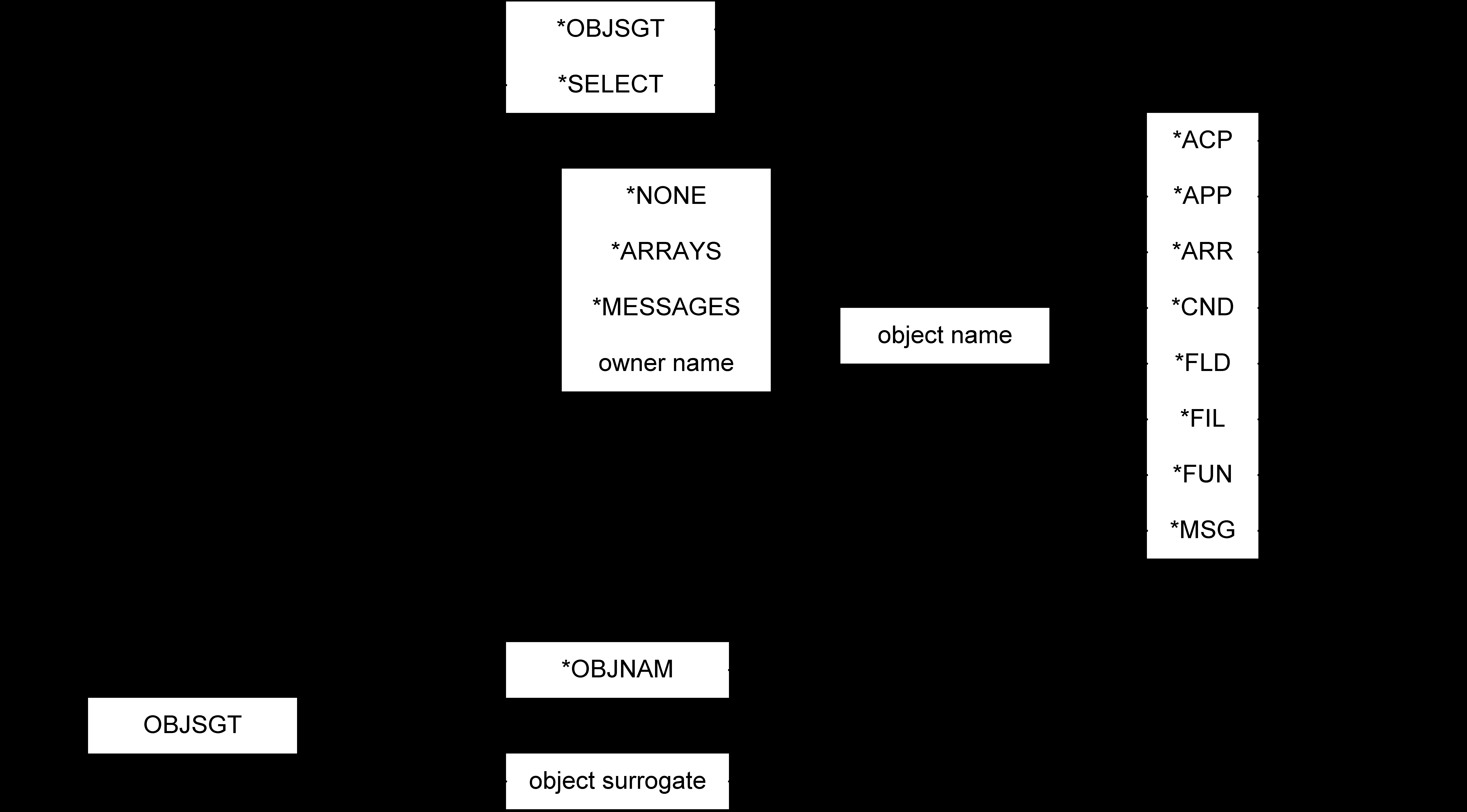
OBJNAM
The object name to be added. This parameter consists of three elements which together identify a model object. Values for this parameter are described in the following:
- *OBJSGT—(default) Single value indicating that the object surrogate is used to identify the model object to be added.
- *SELECT—Single value indicating that the object to be added is selected using an interactive display function.
- Object owner name—The character name of the object that owns the object to be added. Thus, for a function, the owning file would be entered.
- *ARRAYS—Special value for the product internal file *ARRAYS.
- *MESSAGES—Special value for the product internal file *MESSAGES.
- Object name—The character name of the object to be added.
- Object type—The object type of the object.
- *ACP—Object is of type access path.
- *APP—Object is of type application area.
- *ARR—Object is of type array.
- *CND—Object is of type condition.
- *FIL—Object is of type file.
- *FLD—Object is of type field.
- *FUN—Object is of type function.
- *MSG—Object is of type message.
OBJSGT
Unique number identifier of the model object that is added. Values for this parameter are described in the following:
- *OBJNAM—(default) Use object name to identify the model object to be added.
- Object surrogate—The surrogate number of the model object.
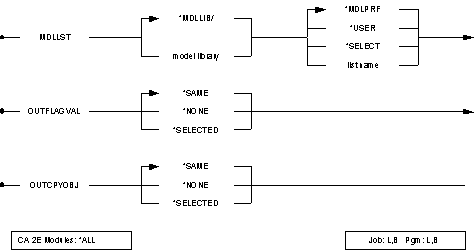
MDLLST
The qualified name of the model object list to which the entry is added. Values for this parameter are described in the following:
- *MDLPRF—(default) Special value meaning that the model object list name is retrieved from the user profile extension record for the current user in the specified model library.
- *USER—Special value meaning that the user profile name of the current user is used as the list name for the target of the command.
- *SELECT—Special value indicating that the model object list is selected using an interactive display function.
- list name—The name of the list to be added.
- *MDLLIB—(default) Special value meaning that the first model library found in the user's current library list is used.
- library name—The name of the model library.
OUTFLAGVAL
This parameter specifies the initial value to be placed in the object selected flag associated with each list entry. Values for this parameter are described in the following:
- *SAME—(default) No flag value is to be used. New entries are written with the flag indicating that the entry is not selected. There is no change to the selection status of existing entries.
- *NONE—New and existing entries are flagged as not selected.
- *SELECTED—New and existing entries are flagged as selected. This flag can be used by other list commands when selecting list entries.
OUTCPYOBJ
This parameter specifies the initial value to be placed in the copy object flag associated with each list entry. This flag is used by the Copy Model Object Command (YCPYMDLOBJ) when selecting objects to copy to a target model. Values for this parameter are described in the following:
- *SAME —(default) No flag value is to be used. New entries are written with the flag indicating that the entry is not selected. There is no change to the selection status of existing entries.
- *NONE—New and existing entries are flagged as not selected.
- *SELECTED—New and existing entries are flagged as selected.
Notes
- A value other than *MDLLIB for MDLLST can result in the library list being changed during execution of this command. If the user is currently editing a model, the switching of the library list will not occur and the command will fail. If changed during processing, the library list is changed back after execution.
- Model objects can either be identified by object name (OBJNAM) or by object surrogate key number (OBJSGT). If the OBJNAM parameter is used, the processing program must convert to surrogate key number internally. Thus, it will normally be more efficient to use the surrogate number if this value is available. The surrogate number for an object can be obtained using the Retrieve Model Object command (YRTVMDLOBJ).
- The object to be added to the target list must exist in the model.
Example
To add the Display Product Details function to model object list WRKLST, and to have the new entry flagged as selected:
YADDMDLLE OBJNAM('Product' 'Display Product + Details' *FUN)
MDLLST(*MDLLIB/WRKLST) + OUTFLAGVAL(*SELECTED)
YAPYCMPCHG (Apply Component Changes) Command
Component change processing is the process by which a change to a particular object is reflected in the model by the propagation of that change throughout the users of the changed object. The object that is changed can be a component of many other objects in the model, and this process attempts to make the repercussions visible. This command can be used to invoke this process in batch for all changed objects which were not processed interactively.
Required
Parameters
The following are parameters for the YAPYCMPCHG command.
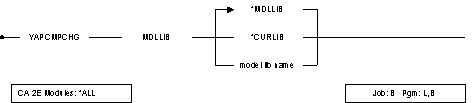
MDLLIB
The name of the model library in which component changes are applied. Values for this parameter are described in the following:
- *MDLLIB—(default) Special value meaning that the model library is the first model found in the current job's library list.
- *CURLIB—Special value meaning that the model library is the current library for the job.
- model library name—The name of the model.
Notes
- Processing involves the examination of all objects in the model that have been changed but that have not had component change processing applied. The using objects of each of these objects are expanded and the change type associated with the changed object is propagated throughout them. The changed object is then updated to show that component change processing has been applied.
- Processing includes a call to an exit program for each using object encountered. The details of the call are as follows:
Program       :      YCMPCHGR1C

Interface     :      Return code           :   7 characters
                     Original surrogate    :   7 decimals
                     Object surrogate      :   7 decimals
                     Change type           :   3 characters (GEN or EDT)
Developers can use the program to include any additional processing they desire. For example, it can be used to update an external database tracking changes in the model, or to place an entry onto a model list for later resolution of the component change that has happened to a given object.
Additional information is included in the source for the exit program which is shipped in file QCLSRC in library Y2SYSRC.
Example
To apply component changes in the model library that is the highest model in the current library list:
YAPYCMPCHG MDLLIB( *MDLLIB )
YAPYMDLCHG (Apply Model Changes) Command
Upgrades a design model or models with any changes required by a new release of CA 2E. New releases of CA 2E can include modifications that must be applied to each design model before the new release of CA 2E can be used with that model. This command applies any such changes to a named model.
Required
Parameters
The following are parameters for the YAPYMDLCHG command.
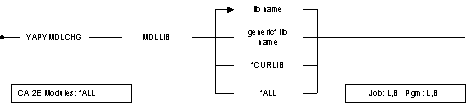
MDLLIB
Name of library containing a design model to which the changes are applied. A generic name is allowed; for example, AB*. Values for this parameter are described in the following:
- *ALL—All models on the machine are upgraded. (Models which have already been upgraded are ignored).
- *CURLIB—Use current library for invoking job.
Notes
- You should make a backup of the design model before running this command.
- You must have object existence rights to the model to be able to run this command; that is, to all the objects in the model library.
- The current release level of the design model is indicated by a data area YMDLLVLRFA, a copy of which resides in each model library. You can see the value on the model values display.
- The current release level of the design model expected by CA 2E is indicated by a data area YMDLLVLSYA in the product library. You can see the value on the system parameter display.
- The YAPYMDLCHG command is generally cumulative. See your installation instructions regarding any restrictions. If you have an old model that you have archived to cartridge or tape and then restored, you can use the YAPYMDLCHG command to bring the model up to date.
- The YAPYMDLCHG command invokes the command Apply System Data to Model (YAPYSYSMDL) if necessary.
- Once a model has been upgraded to a new level using the YAPYMDLCHG command, it cannot be converted downwards again.
- If this command fails, you should resolve the problem with your product support representative, then restore the backup copy of your model from tape and start again.
- If all of the prior level files are not deleted by YAPYMDLCHG, an error message is issued at the end of the conversion. These files will have been renamed to start with Z. The usual cause of this problem is user logical files that are built over design model physical files. The model is properly converted, but you must manually delete these Z files.
Example
To update the model MYMDL:
YAPYMDLCHG MDLLIB(MYMDL)
YAPYSYSMDL (Apply System Model Data) Command
Updates the system data part of a CA 2E model. Each design model contains, apart from user-defined objects, a number of the shipped system objects, such as standard program functions and default message functions. From time to time updates are issued to the system objects. This command is for applying the updates to your own models.
Required
Parameters
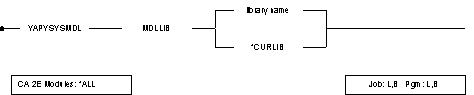
The following are parameters for the YAPYSYSMDL command.
MDLLIB
Name of library containing a design model. The system object part of this model is to be updated. The value for this parameter is described in the following:
- *CURLIB—Use current library for invoking job.
Notes
- The current release level of the system objects in a model is indicated by a data area YMDLNBRRFA, a copy of which resides in each model library. You can see the current value on the model values display.
- The current release level of the system objects required by CA 2E is indicated by the data area YMDLNBRSYA in the product library. The current value can be seen on the model values display.
- You automatically invoke this command by using the command Apply Model Changes (YAPYMDLCHG)
Example
To update the system objects in model MYMDL:
YAPYSYSMDL MDLLIB(MYMDL)
YAPYTRNMDL (Apply Translation to Model) Command
Transposes data from a national language library into the system portion of a design model. This command translates the data in the CA 2E shipped files that are created by the Create Model Library command (YCRTMDLLIB), such as *Standard header/footer, *Built-in functions and *Program data.
Required
Parameters
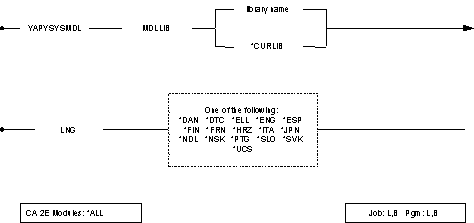
The following are parameters for the YAPYTRNMDL command
MDLLIB
Name of library containing a design model to which the translations are applied. The value for this parameter is described in the following:
- *CURLIB—Use current library for invoking job.
LNG
National language used for translation. Values for this parameter are described in the following:
- DAN—Danish
- DTC—German
- ELL—Greek
- ENG—English
- ESP—Spanish
- FIN—Finnish
- FRN—French
- HRZ—Croatian
- ITA—Italian
- JPN—Japanese
- NDL—Dutch
- NSK—Norwegian
- PTG—Portuguese
- SLO—Slovenian
- SVK—Swedish
- UCS—English Upper Case
Notes
- You must have the appropriate national language product library installed on your machine in order for the command to function.
- You must have object existence rights to all the objects in the model library to be able to run this command.
- The current national language of the data model is shown on the system parameter display (YDSPMDLVAL).
- The release level of the data model and the national language product level must be compatible.
Example
To translate system data files in the model MYMDL into French:
YAPYTRNMDL MDLLIB(MYMDL) LNG(*FRN)
YBLDJOBLST (Build Job List) Command
Builds a job list of selected objects in a design model. You can use this list in the following commands:
- YSBMMDLCRT submits the job list to be generated and/or compiled.
- YCHKJOBLE checks the existence of corresponding source members and i OS objects for each job list entry.
- YCVTJOBLST converts the job list to a CA 2E Toolkit object list.
Optional





Parameters
The following are parameters for the YBLDJOBLST command.
APPCDE
Name of the application area from which the objects to be included in the job list are selected. The value for this parameter is as follows:
- *ALL—(default) Include functions and access paths from all application areas.
MDLFILE
Generic name of files whose dependent access paths and/or functions are included in the job list. Values for this parameter are described in the following:
- *ALL—(default) Include the objects dependent on all user-defined files in the model.
- *GENERIC—Use generic name.
MDLACP
Generic name of access paths that are included in the job list. Values for this parameter are described in the following:
- *ALL—(default) All access paths for the specified files are included.
- *NONE—No access paths are included.
- *GENERIC—Use generic name.
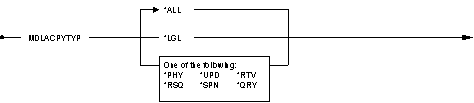
MDLACPTYP
Specifies the type or types of access paths you want to include in the job list. Values for this parameter are described in the following:
- *ALL—(default) Include all access path types.
- *LGL—Include all types of access paths other than PHY.
- *PHY—Include only physical access paths.
- *UPD—Include only update access paths.
- *RTV—Include only retrieval access paths.
- *RSQ—Include only resequence access paths.
- *QRY—Include only query access paths.
- *SPN—Include only span access paths.
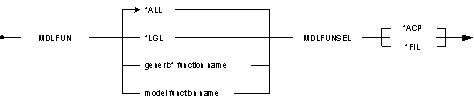
MDLFUN
Generic name of functions included in the job list. Values for this parameter are described in the following:
- *ALL—(default) Include all functions for the specified files or access paths.
- *NONE—Do not include any functions.
- *GENERIC—Use generic name.
MDLFUNSEL
Specifies whether the functions you want to include in the job list are those based on the selected files or those based on the selected access paths. Values for this parameter are described in the following:
- *ACP—(default) Select functions based on the access paths specified by the MDLACP and MDLACPTYP parameters.
- *FIL—Select functions based on the files specified by the MDLFIL parameter.
ACPACT
Activity to be requested for job list entries for access paths. Values for this parameter are described in the following:
- *GEN—(default) Generate and compile.
- *CRT—Compile only.
- *NO—Do not add to job list, only use to select functions.
FUNACT
Activity to be requested for job list entries for functions. Values for this parameter are described in the following:
- *GEN—(default) Generate and compile.
- *CRT—Compile only.
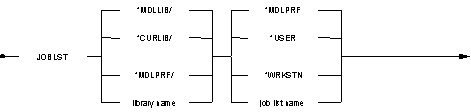
JOBLST
Qualified name of a job list where you place entries. Values for this parameter are described in the following:
- *MDLPRF—(default) The job list name is retrieved from the model profile details for the current user.
- *MDLLIB/*USER—Default the job list name to user profile name, and store list in model library.
- *WRKSTN—Default the job list name to job name of invoking job.
- *MDLPRF/—The job list library is retrieved from the model profile details for the current user.
LSTOPT
List replacement option. Values for this parameter are described in the following:
- *REPLACE—(default) Create a new list, replacing any previous list's contents.
- *ADD—Add to any existing list's contents.
CUROBJ
Controls whether only current objects are included in the output list. Values for this parameter are described in the following:
- *YES—(default) Non-current objects are ignored in the build.
- *NO—All objects are included in the build.
Notes
- If a value of *NONE is specified for the MDLACP parameter, then a value of *ACP is not allowed for the MDLFUNSEL parameter.
- If a value of *NONE is specified for the MDLACP parameter, then a value of *NONE is not allowed for the MDLFUN parameter.
- For each access path or function selected, the YBLDJOBLST command will add entries to the job list for the necessary implementation objects. For example, for an interactive function, both the program and the display file will be added to the job list.
- The library specified for the job list must be the same as the model library.
- A completion message is returned, giving a count of the number of access paths and functions added to the list.
- Only external functions based on a specified file/access path are selected. If an internal function is based on the specified file/access path, the external functions which use the internal function will not be selected (unless they also are based on the specified file/access path).
- File to file dependencies are not handled by this command. For example, if an order detail file is owned by an order file and the order file is changed, then the access paths/functions based on the order detail file will only be selected by YBLDJOBLST if the order detail file is specified in the MDLFILE parameter.
Example
To build a job list of all access paths and functions in a design model:
YBLDJOBLST
To build a job list of all functions in a design model over all files and access paths, but omitting the access paths from the job list:
YBLDJOBLST
To build a job list of all logical access paths and functions in a design model which are based on files whose names start with "Order":
YBLDJOBLST MDLFILE(ORDER*) + MDLACPTYP(*LGL)
YBLDMDLLST (Build a Model Object List) Command
This command allows a user to build a model object list. The list may or may not exist. If it exists, it can be added to or replaced by taking the appropriate option on the LSTOPT parameter.
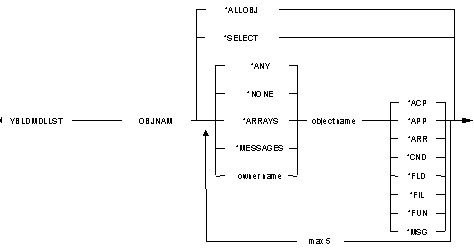
Only certain model objects can be selected for inclusion in a list. See the command diagram for a list of valid object types.
Once the list has been built, it can be used by the other model list processing commands. Normally a user will edit a list after creation using the Edit Model Object List command (YEDTMDLLST), or process entries in the list using one of the model list processing commands. See the command diagram of these commands for more details.






Parameters
The following are parameters for the YBLDMDLLST command.
OBJNAM
The object name to be added. This parameter consists of three elements which together identify a model object. Values for this parameter are described in the following:
- *ALLOBJ—(default) Single value indicating that all model objects are included.
- *SELECT—Single value indicating that the object to be added is selected using an interactive display function.
- object owner name—Generic name of the object that owns the object(s) to be added. Thus, for a function, the owning file would be entered.
- *ARRAYS—Special value for the product internal file *ARRAYS.
- *MESSAGES—Special value for the product internal file *MESSAGES.
- object name—Generic name of the object(s) to be added.
- object type—The object type of the object.
- *ALL—All object types are added.
- *ACP—Object is of type access path.
- *APP—Object is of type application area.
- *ARR—Object is of type array.
- *CND—Object is of type condition.
- *FIL—Object is of type file.
- *FLD—Object is of type field.
- *FUN—Object is of type function.
- *MSG—Object is of type message.
MDLLST
The qualified name of the model object list that is built. All output is directed to the list specified in this parameter. Values for this parameter are described in the following:
- *MDLPRF—(default) Special value meaning that the model object list name is retrieved from the user profile extension record for the current user in the specified model library.
- *USER—Special value meaning that the user profile name of the current user is used as the list name for the target of the command.
- list name—The name of the list to be built can be entered.
- *MDLLIB—(default) Special value meaning that the first model library found in the user's current library list is used as the target model for the list.
- library name—The name of the model library to be the target of the command.
LSTOPT
This parameter specifies the action taken if the list already exists in the model. Values for this parameter are described in the following:
- *REPLACE—(default) The existing model object list is replaced with the output from this command.
- *ADD—The existing model object list is augmented with the output from this command.
OUTFLAGVAL
This parameter specifies the initial value to be placed in the object selected flag associated with each list entry. Values for this parameter are described in the following:
- *SAME—(default) No flag value is used. New entries are written with the flag indicating that the entry is not selected. There is no change to the selection status of existing entries.
- *NONE—New and existing entries are flagged as not selected.
- *SELECTED—New and existing list entries are flagged as selected. This flag may be used by other list commands when selecting list entries.
OUTCPYOBJ
This parameter specifies the initial value to be placed in the copy object flag associated with each list entry. This flag is used by the Copy Model Object command (YCPYMDLOBJ) when selecting objects to copy to a target model. Values for this parameter are described in the following:
- *SAME—(default) No flag value is used. New entries are written with the flag indicating that the entry is not selected. There is no change to the selection status of existing entries.
- *NONE—New and existing entries are flagged as not selected.
- *SELECTED—New and existing list entries are flagged as selected.
INCSYSOBJ
This parameter allows the user to control whether system objects are included in the output list. Values for this parameter are described in the following:
- *NO—(default) The system objects are not included.
- *YES—System objects are included.
CUROBJ
This parameter allows the user to control whether only current objects are included in the output list. Values for this parameter are described in the following:
- *YES—(default) Non-current objects are ignored in the build.
- *NO—All objects are included in the build.
FILTER
The initial output of the command can be filtered. If specified, this parameter invokes the Filter Model Object List command (YFLTMDLLST). Values for this parameter are described in the following:
- *NO—(default) The filter command is not invoked.
- *YES—Filtering is required.
Notes
- The target library for output must be a valid model library. Object lists are be created in file YMDLLSTRFP which resides in the model library. Each list is a separate member in that file. If a value other than *MDLLIB is used for the output list, the specified model library will also be used for object selection.
- A value other than *MDLLIB for MDLLST may result in the library list being changed. If the user is currently editing a model, the switching of the library list will not occur and the command will fail. If changed during processing, the library list is changed back after execution.
- *SELECT is invalid for OBJNAM if the job in which the command is running is of type batch.
- The LSTOPT parameter is ignored if the model object list does not already exist.
- The FILTER parameter is ignored if the job running the command is a batch job, since the method for defining the filter criteria is via the command prompter, requiring an interactive display.
Example
To build model object list MYLIST from all access paths and functions in the model contained in the current library list:
YBLDMDLLST OBJNAM( (*ANY *ALL *ACP) +
(*ANY *ALL *FUN) )
YCHGMDLLE (Change a Model Object List Entry) Command
This command allows a user to change the selection flags of a model object list entry.
Required

Optional


Parameters
The following are parameters for the YCHGMDLLE command.
OBJSGT
Unique number identifier of the model object that is changed. The value for this parameter is as follows:
- object surrogate—The surrogate number of the model object is required.
MDLLST
The qualified name of the model object list in which the entry to be changed exists. Values for this parameter are described in the following:
- *MDLPRF—(default) Special value meaning that the model object list name is retrieved from the user profile extension record for the current user in the specified model library.
- *USER—Special value meaning that the user profile name of the current user is to be used as the list name for the target of the command.
- *SELECT—Special value indicating that the model object list is selected using an interactive display function.
- list name—The name of the list.
- *MDLLIB—(default) Special value meaning that the first model library found in the user's current library list is used.
- library name—The name of the model library.
OBJSEL
This parameter specifies the value to be placed in the object selected field of the list entry. Values for this parameter are described in the following:
- *SAME—(default) The value currently in this field is not changed.
- *NONE—The entry is flagged as not selected.
- *SELECTED—The entry is flagged as selected.
- *ERROR—The entry is flagged in error.
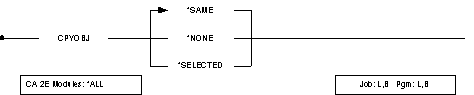
CPYOBJ
This parameter specifies the value placed in the copy object field of the list entry. Values for this parameter are described in the following:
- *SAME—(default) The value currently in this field is not changed.
- *NONE—The entry is flagged as not selected.
- *SELECTED—The entry is flagged as selected.
Notes
- The flagging of list entries is intended to allow users to perform operation on subsets of model objects contained in model object lists. Note that the object selected field (OBJSEL) is recognized by many of the list commands. However, the copy object field (CPYOBJ) is recognized only by the Edit Copy List command (YEDTCPYLST) and the Copy Model Objects command (YCPYMDLOBJ). A value of *SELECTED in the copy object field effectively means explicitly selected or selected for copying for the purposes of the Copy Model Objects command (YCPYMDLOBJ).
- Both the model object list and the list entry must exist prior to running this command.
Example
To change the model object list entry for the object identified by surrogate number 1100911, in model object list DEVLST in the first model library to be found in the current library list, and to flag the entry as *SELECTED for use in another list command:
YCHGMDLLE OBJSGT( 1100911 ) MDLLST + (*MDLLIB/DEVLST ) OBJSEL( *SELECTED )
YCHGMDLOBJ (Change Model Object) Command
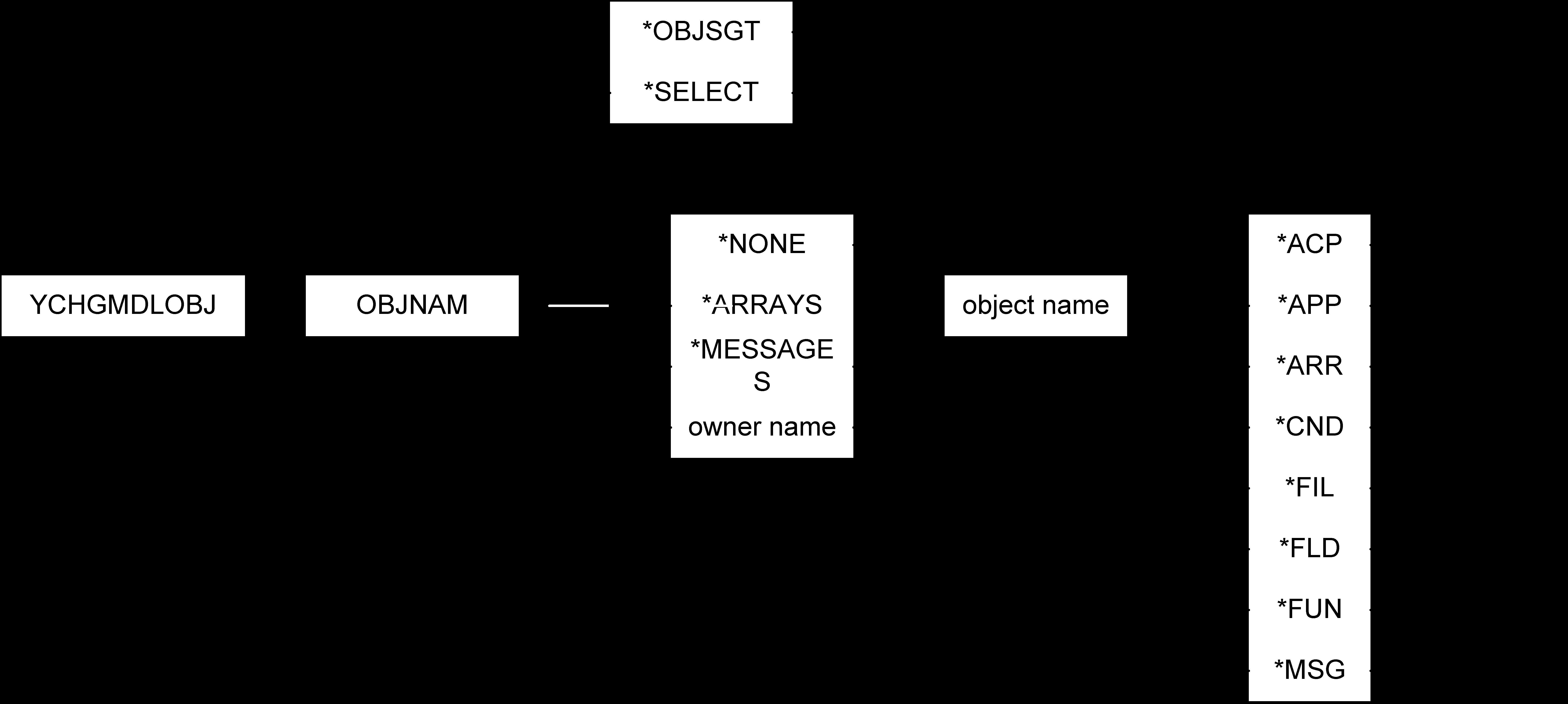
This command provides access to certain user-definable data that is stored for each model object. The command diagram described below shows which data are available to be updated.
We recommend that you use this information to support a user-defined change control facility operating on a model.
Required


Optional





Parameters
The following are parameters for the YCHGMDLOBJ command
OBJNAM
The object name to be changed. This parameter consists of three elements that together identify a model object. Values for this parameter are described in the following:
- *OBJSGT—(default) Single value indicating that the object surrogate is to be used to identify the model object that is to be changed.
- *SELECT—Single value indicating that the object to be changed is selected using an interactive display function.
- object owner name—The character name of the object that owns the object to be changed. Thus, for a function, the owning file would be entered.
- *NONE—Special value indicating that the object concerned does not have an owner; for example, objects of type *FIL.
- *ARRAYS—Special value for the product internal file *ARRAYS.
- *MESSAGES—Special value for the product internal file *MESSAGES.
- object name—The character name of the object to be changed.
- object type—The object type of the object.
- *ACP—Object is of type access path.
- *APP—Object is of type application area.
- *ARR—Object is of type array.
- *CND—Object is of type condition.
- *FIL—Object is of type file.
- *FLD—Object is of type field.
- *FUN—Object is of type function.
- *MSG—Object is of type message.
OBJSGT
Unique number identifier of the model object whose details are to be changed. Values for this parameter are described in the following:
- *OBJNAM—(default) Use object name to identify the model object to be changed.
- object surrogate—The surrogate number of the model object.
MDLLIB
The data model that is to be edited. Values for this parameter are described in the following:
- *MDLLIB—(default) The model to be edited is the first one found in the current job's library list.
- model name—The name of a specific data model.
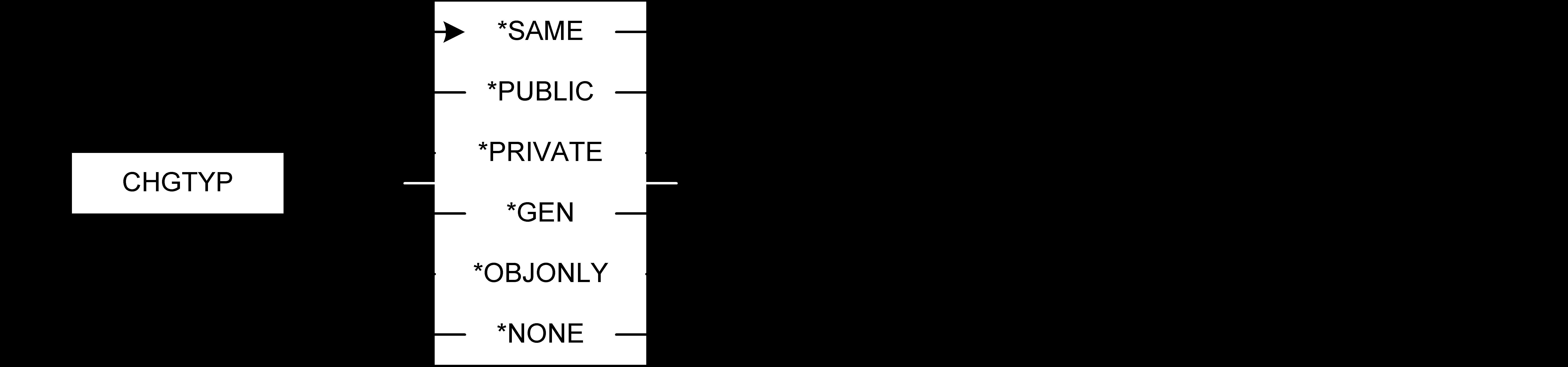
CHGTYP
Reflects the type of change that has been made to the object. Note that changing this field may also cause the Action required flag (ACTRQD) for objects that use this object to be updated. Values for this parameter are described in the following:
- *SAME—(default) The current model object value is not to be changed.
- *PUBLIC—The object has been publicly changed. Appropriate component change processing will be performed.
- *PRIVATE—The object has been privately changed. Appropriate component change processing will be performed.
- *GEN—The object has been changed requiring generation of the implementation object only. This is only valid for generatable objects. No component change processing will be performed.
- *OBJONLY—The object has been changed. However, the change does not affect using objects and no source generation is required.
- *NONE—The object has been changed but requires no further action. No component change processing will be performed.
IPCPRC
Indicates whether users of the object have been processed to reflect the effect on them resulting from the change made to the object. A Change type (CHGTYP) of *PRIVATE or *PUBLIC recorded for the object will have an effect on its users. When the effect is established during component change processing, the impact processed flag is set to *YES. As a result, changing this flag will either cause component change processing to be performed or avoided, depending on the value to which it is set. Values for this parameter are described in the following:
- *SAME—(default) The current value is not to be changed.
- *YES—The object is to be treated as if component change processing had been performed.
- *NO—The object is to be treated as if component change processing had not been performed. As a result, if the Change type (CHGTYP) value is *PRIVATE or *PUBLIC, component change processing will be invoked either the next time the object is changed if component change processing is set to occur interactively when the Apply Component Changes (YAPYCMPCHG) command is run.
PRMTYP
Promotion type to be performed on this object, as part of a change control system. Values for this parameter are described in the following:
- *SAME—(default) The current model object value is not to be changed.
- *ADD—The object is to be added to the target environment.
- *CHG—The object is to replace the same object in the target environment.
- *GEN—The object is to be regenerated only in the target environment; the design object is not to be promoted.
- *NONE—No promotion type is to be associated with the object.
VSNTYP
This field identifies the status of an object with respect to other members of a group of objects. A group is defined by those objects that originated (were copied) from the same object or another member of the group. This field is intended for use with a promotion procedure and identifies which version of a group is the development version, the production version, and the archive version. Values for this parameter are described in the following:
- *SAME—(default) The current model object value is not to be changed.
- *DEV—Change the model object value to indicate that it is the development version.
- *PRD—Change the model object value to indicate that it is the production version.
- *ARC—Change the model object value to indicate that it is the archive version.
VSNSNC
This user-defined field is intended for use by a change management system. You could set it in a checkout procedure to indicate that a version of an object is in conflict with another version; for example, when an object is checked out by two users. The conflict could then be detected when you attempt to promote one of the versions. Values for this parameter are described in the following:
- *SAME—(default) The current model object value is not to be changed.
- *YES—Change the model object value to indicate that the condition represented by yes is true; for example, *YES could indicate that a conflict exists.
- *NO—Change the model object value to indicate that the condition represented by no is true; for example, *NO could indicate that no conflict exists.
CHKDTE
This user-defined field is intended for use by a change management system, to contain the date a checkout procedure was run to check out the model object. Values for this parameter are described in the following:
- *SAME—(default) The current model object value is not to be changed.
- *NONE—A special value meaning that any value in this field is to be replaced with zero.
- *DATE—A special value meaning that the current system date is to be used.
- date—A date value may be entered.
CHKTME
This user-defined field is intended for use by a change management system, to contain the time a checkout procedure was run to check out the model object. Values for this parameter are described in the following:
- *SAME—(default) The current model object value is not to be changed.
- *NONE—A special value meaning that any value in this field is to be replaced with zero.
- *TIME—A special value meaning that the current system time is to be used.
- time—A time value may be entered.
CHKUSR
This user-defined field is intended for use by a change management system, to contain the user profile of the user who ran a checkout procedure to check out the model object. Values for this parameter are described in the following:
- *SAME—(default) The current model object value is not to be changed.
- *NONE—A special value meaning that any value in this field is to be replaced with blanks.
- *USER—The name of the current user profile is used to update the model object value.
- user name—A user profile name can be entered.
CHKLST
This user-defined field is intended for use by a change management system, to contain the name of the model object list from which the model object was checked out as part of a checkout procedure. Values for this parameter are described in the following:
- *SAME—(default) The current model object value is not to be changed.
- *NONE—A special value meaning that any value in this field is to be replaced with blanks.
- *USER—The name of the current user profile is used to update the model object value.
- list name—A model object list name can be entered.
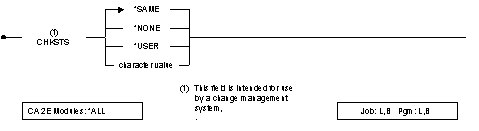
CHKSTS
This user-defined field is intended for use by a change management system, to contain the checkout status of the model object when used as part of a checkout procedure. Values for this parameter are described in the following:
- *SAME—(default) The current model object value is not to be changed.
- *NONE—A special value meaning that any value in this field is to be replaced with blanks.
- character value—A user-defined value can be entered.
Example
To change the Order Details file, enter the following:
YCHGMDLOBJ OBJNAM( *NONE 'Order Details' + *FIL)
YCHGMDLOD (Change Model Object Description) Command
This command accesses an interactive panel that displays the details for a given model object. All details are display only.
For more information on using the interactive panel, see online Help for the specific panel.
Required

Parameters
The following are parameters for the YCHGMDLOD command.
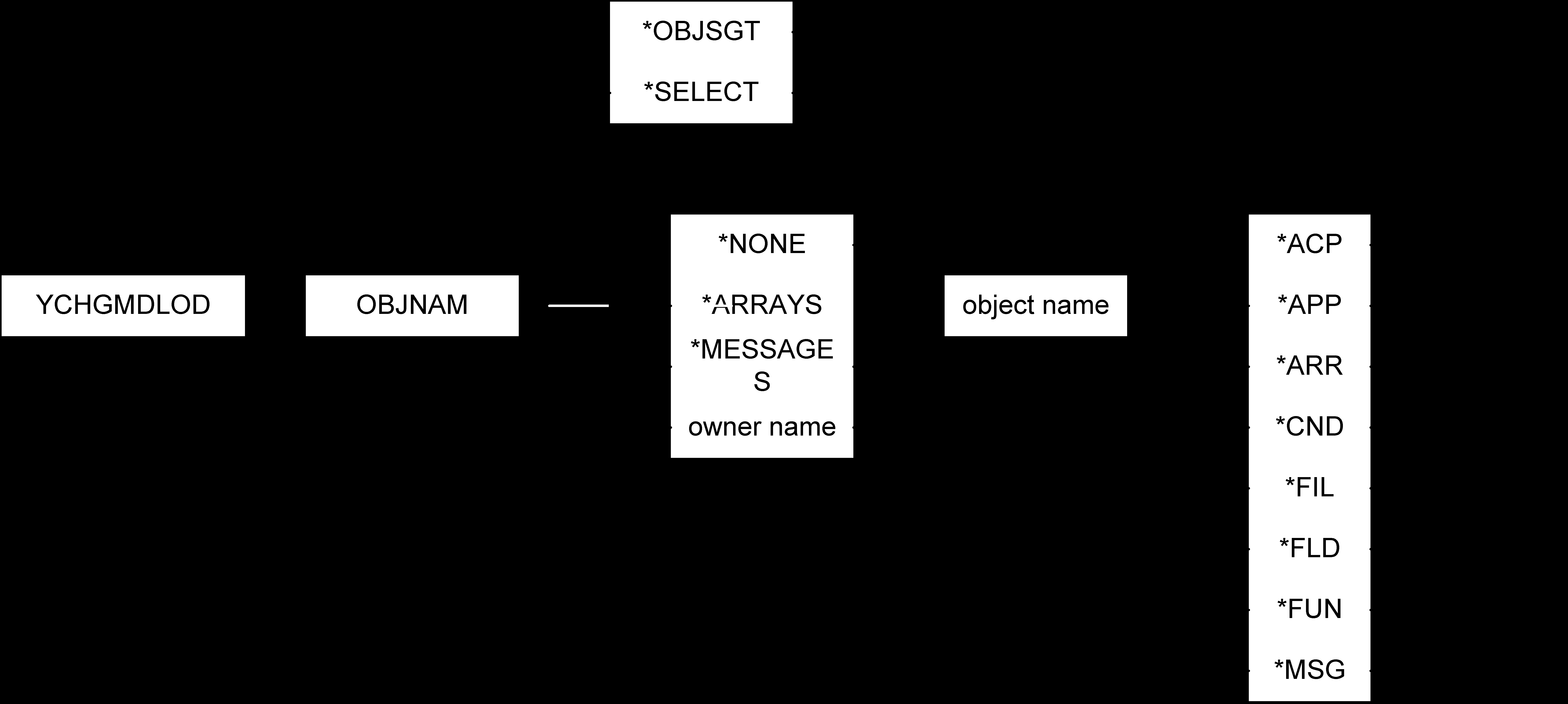
OBJNAM
The name of the model object to be changed. This parameter consists of three elements that together identify a model object. Values for this parameter are described in the following:
- *OBJSGT—(default) Single value indicating that the object surrogate is to be used to identify the model object that is to be changed.
- *SELECT—Single value indicating that the object to be changed is selected using an interactive display function.
- object owner name—The character name of the object that owns the object to be changed. Thus, for a function, the owning file would be entered.
- *NONE—Special value indicating that the object concerned does not have an owner; for example, objects of type *FIL.
- *ARRAYS—Special value for the product internal file *ARRAYS.
- *MESSAGES—Special value for the product internal file *MESSAGES.
- object name—The character name of the object to be changed.
- object type—The object type of the object.
- *ACP—Object is of type access path.
- *APP—Object is of type application area.
- *ARR—Object is of type array.
- *CND—Object is of type condition.
- *FIL—Object is of type file.
- *FLD—Object is of type field.
- *FUN—Object is of type function.
- *MSG—Object is of type message.
OBJSGT
Unique number identifier of the model object that is to be changed. Values for this parameter are described in the following:
- *OBJNAM—(default) Use object name to identify the model object to be changed.
- object surrogate—The surrogate number of the model object.
MDLLIB
The data model in which the object whose description is to be changed resides. Values for this parameter are described in the following:
- *MDLLIB—(default) The model is the first one to be found in the current library list.
- model name—The name of a specific data model.
Notes
|
Type
|
Name
|
|
ACP
|
File name/Access path name/'ACP'
|
|
APP
|
---/Application area code/'APP'
|
|
ARR
|
*Arrays/Array name/'ARR'
|
|
CND
|
Field name/Condition name/'CND'
|
|
FIL
|
---/File name/'FIL'
|
|
FLD
|
---/Field name/'FLD'
|
|
FUN
|
File name/Function name/'FUN'
|
|
MSG
|
*Messages/Message name/'MSG'
|
Example
To change the Edit Order Details function, which is owned by the Order Details file, enter the following:
YCHGMDLOD OBJNAM('Order Details' 'Edit Order + Details' *FUN)
YCHGMDLPRF (Change Model Profile) Command
Certain data is stored in each data model associated with user profiles of developers. This command allows these values to be adjusted.
Required

Optional










Parameters
The following are parameters for the YCHGMDLPRF command.
MDLPRF
The model user profile name that is changed. The value for this parameter is as follows:
- user profile name—The name of the user profile must be entered.
SSNLST
The name of the session list used when editing a model. Values for this parameter are described in the following:
- *SAME—(default) The current value is not changed.
- *MDLPRF—This special value indicates that the name of the current user profile is loaded to the session list field.
- list name—The name of the list can be entered.
LOGCHG
This parameter indicates whether changed objects are logged to the specified session list while editing the model. Values for this parameter are described in the following:
- *SAME—(default) The current value is not changed.
- *YES—Changed objects are logged to the session list.
- *NO—Changed objects are not logged.
COMPCHG
This parameter indicates whether objects that use a changed object are to be flagged as having had a component changed. Values for this parameter are described in the following:
- *SAME—(default) The current value is not changed.
- *YES—Objects which use a changed object are flagged when the object is changed.
- *NO—Component change processing is not performed when the object is changed. It may be performed later using the Apply Component Change command (YAPYCMPCHG).
VIEWONLY
This parameter indicates whether the current user is navigating the model in *VIEW mode or *EDIT mode. Values for this parameter are described in the following:
- *SAME—(default) The current value is not changed.
- *YES—Navigation is in *VIEW mode.
- *NO—Navigation is as normal (*EDIT mode).
USROPT
The Edit Model List panel supports the use of user options to be applied to subfile records. This field stores the user option file name to use. Values for this parameter are described in the following:
- *SAME—(default) The current value is not changed.
- QAUOOPT—The system-supplied user option file name.
- list name—User-defined file name.
- *LIBL—This special value is used as the library name.
- library name—A library name can be entered.
USROPTMBR
The member in the user options file that is used. Values for this parameter are described in the following:
- *SAME—(default) The current value is not changed.
- *FILE—The member name is the same as the user options file name.
- *FIRST—The first member in the file is to be used.
- *MDLPRF—The member name is the same as the current user profile name.
- member name—The user options member name.
MDLLST
The list used if *MDLPRF is specified on a model object list command. Values for this parameter are described in the following:
- *SAME—(default) The current value is not changed.
- *MDLPRF—A list with the same name as the user profile is used.
NPDFUN
The user-defined notepad function to use when using the action diagram editor. The function specified must either be an Execute External Function (EXCEXTFUN) or an Execute Internal Function (EXINTFUN). Values for this parameter are described in the following:
- *SAME—(default) The current value is not changed.
- *NONE—No particular notepad function is specified, the action diagram editor will provide an empty notepad for use during editing sessions.
- notepad function—The function name must be specified.
ADESRNMODE
This parameter provides the default for full screen mode when using the action diagram editor. Values for this parameter are described in the following:
- *SAME—The current value is not changed.
- *YES—The default for the action diagram editor full screen mode is yes.
- *NO—The default for full screen mode is no.
JOBLST
When a user invokes the Submit Model Create command (YSBMMDLCRT), this qualified value can be used to determine the job list that is defaulted. Values for this parameter are described in the following:
- *SAME—(default) The current value is not changed.
- *MDLPRF—A job list with the same name as the user profile is the default.
- list name—Job list name.
- *MDLLIB—This special value is used as the default library name.
- *CURLIB—This special value is used as the default library name.
- library name—Default library name.
GENLIB
The default generation library name may be specified. When a user invokes the Submit Model Create command (YSBMMDLCRT), this value will be used by default. Values for this parameter are described in the following:
- *SAME—(default) The current value is not changed.
- *GENLIB—This special value is the default.
- *CURLIB—This special value is the default.
- library name—Default library name.
SRCLIB
The default source library name may be specified. When a user invokes the Submit Model Create command (YSBMMDLCRT), this value will be used by default. Values for this parameter are described in the following:
- *SAME—(default) The current value is not changed.
- *GENLIB—This special value is the default.
- *CURLIB—This special value is the default.
- *OBJLIB—Special value meaning that the source library name is the same as for the GENLIB parameter.
- library name—Default library name.
JOBD
The default job description name to use when a user invokes the Submit Model Create command (YSBMMDLCRT). This qualified value will be used as the default. Values for this parameter are described in the following:
- *SAME—(default) The current value is not changed.
- *MDLVAL—This special value is the default.
- job description name—The job description name.
- *MDLLIB—This special value is the default library in which to find the job description.
- *CURLIB—This special value is the default library in which to find the job description.
- *LIBL—This special value is the default library in which to find the job description.
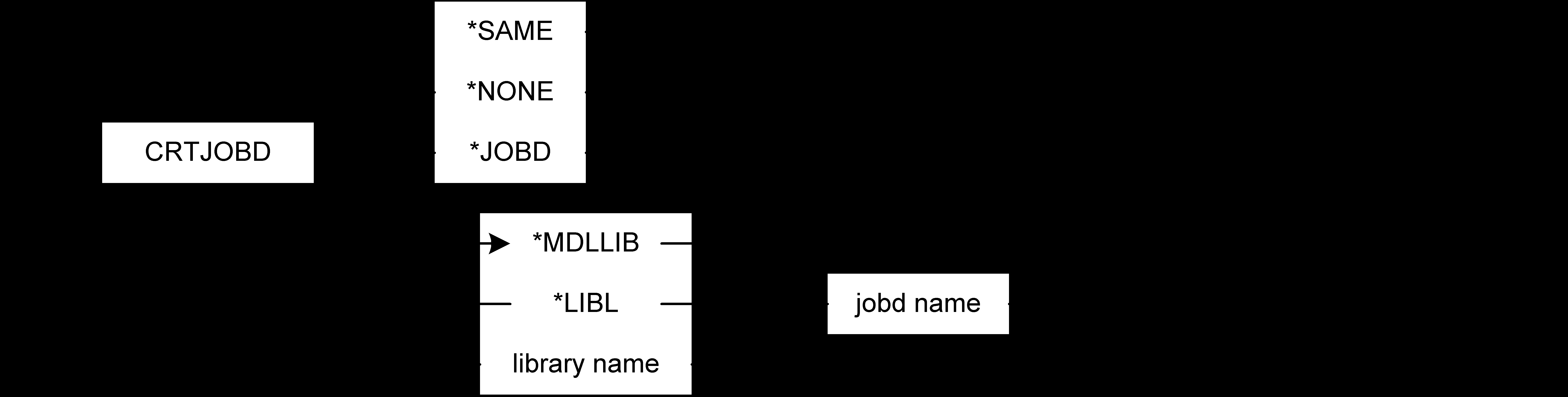
CRTJOBD
The default create job description name to use when a user invokes the Submit Model Create command (YSBMMDLCRT). This qualified value will be used as the default. Values for this parameter are described in the following:
- *SAME—(default) The current value is not changed.
- *JOBD—This special value is the default.
- *NONE—This special value is the default.
- job description name—The create job description name.
- *MDLLIB—This special value is the default library in which to find the job description.
- *LIBL—This special value is the default library in which to find the job description.
SBMGENOPT
The default generation option value to use when a user invokes the Submit Model Create command (YSBMMDLCRT). Values for this parameter are described in the following:
- *SAME—(default) The current value is not changed.
- *RLS—This special value is the default.
- *HLD—This special value is the default.
SBMCRTOPT
The default compilation option value to use when a user invokes the Submit Model Create command (YSBMMDLCRT). Values for this parameter are described in the following:
- *SAME—(default) The current value is not changed.
- *GENOK—This special value is the default.
- *IMMED—This special value is the default.
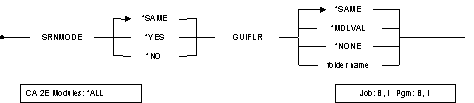
SRNMODE
This parameter determines whether or not the default panel on the Edit Model List command (YEDTMDLLST) is displayed in full screen mode. Values for this parameter are described in the following:
- *SAME—(default) The current value is not changed.
- *YES—The default for full screen mode is yes.
- *NO—The default for full screen mode is no.
GUIFLR
This parameter records the default value for the GUI folder value used when prompting the Submit Model Create (YSBMMDLCRT) command for the specified user. Values for this parameter are described in the following:
- *SAME—(default) The current value is not changed.
- *MDLVAL—The value to be prompted is derived from the model value.
- *NONE—The default value is *NONE.
- folder name—Enter the name of a folder.
Notes
- User profile values for a particular developer are updated while using the Edit Model Object List command (YEDTMDLLST). The YCHGMDLPRF command may be used to adjust values outside the YEDTMDLLST command.
- The processing of the VIEWONLY parameter occurs in the user access exit program (YUSROBJR1C). The shipped default processing switches from *EDIT to *VIEW mode if the VIEWONLY parameter is set. Users should be careful, therefore, when changing the processing of this exit program, to take account of such processing.
Example
To log changed objects to model list CHGOBJ and to perform component change processing the next time user KATHY edits the model:
YCHGMDLPRF MDLPRF( KATHY ) CHGLST + (CHGOBJ ) LOGCHG( *YES ) COMPCHG( *YES )

