

The TMC and Audit data set should be backed up at least once daily by running TMSCOPY. The TMC is backed up first, then the Audit records written since the previous backup are written to tape. There is no need to stop tape processing during TMSCOPY backup processing.
The Audit data set is a direct-access, wraparound data set that must be backed up regularly, or eventually it will fill up. Every update to a TMC record, and certain other tape processing and CA 1 initialization activity, is recorded in the Audit data set. During backup processing, all Audit records written since the previous backup are copied to tape, and logical pointers in the Audit Control Record are reset. Audit records are never physically cleared of information; rather, as new records are written, the new records eventually wrap and overlay older records.
The integrity of the Audit is critical to the TMC restoration process. When the number of Audit records written exceeds a site-defined level, CA 1 issues warning messages to the system console indicating a TMC backup is required. At this point any online/update requests and CA 1 utilities, except TMSCOPY and TMSINIT, will abend with a U0008 error. Should the Audit reach full capacity, CA 1 will abend (S7yy) all jobs requesting tape I/O until TMSCOPY has successfully completed.
A parameter option in the TMOOPTxx member of hlq.CTAPOPTN, THAUDT, establishes the warning threshold limit on the number of Audit records written. This limit is a percentage of the total number of Audit records which can be written before the first IEFTMS9 TMC BACKUP REQUIRED warning message is issued. The system default for THAUDT is 80 percent. When the Audit threshold is reached during normal system processing, the highlighted IEFTMS9 message prompts the operator to backup the TMC. The message includes the percentage of the Audit file that has been utilized. As the utilization increases, a new highlighted IEFTMS9 message is issued with the updated percentage and the previous IEFTMS9 message is deleted. Once the TMC backup has completed, the Audit file utilization drops back to zero and the last IEFTMS9 message is deleted.
The Audit backup tapes contain only those Audit records written since the previous execution of TMSCOPY. This data should be retained for 6 to 12 months to aid in problem analysis, as a problem may go undetected for an extended period of time. TMS Report 31 - Backup/Restore the TMC File should also be saved for at least six months, because it is useful in trend analysis. The records that are written to tape from a BLOCKSET audit data set are not compatable with programs prior to the enhancement. The enhanced programs allow a restore using backups of either or both types of audit data set.
Assuming that TMSCOPY is run once daily, you may want to consider MODing the daily Audit backup files to a weekly Audit file, then MODing the weekly Audit data to a monthly file to minimize the number of tapes involved. For suggested procedures see the Administration Guide.
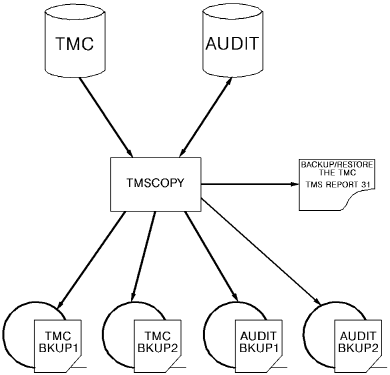
TMSCOPY creates two backups of the TMC as shown in the figure below; the second backup should be stored in an off-site vault. It is a good idea to run TMSCOPY prior to execution of the Vault Management System (VMS) so that an alternate copy of the TMC can be moved off-site with your other data sets (the data set name of this alternate backup must be defined to VMS).
The following diagram illustrates Backing Up TMC and Audit Data with TMSCOPY:
|
Copyright © 2013 CA Technologies.
All rights reserved.
|
|