Installing Microsoft SQL Server 2005 Express With the CA HIPS Server
HIPS can use either Microsoft SQL or Microsoft SQL Server 2005 Express Edition as the database layer.
You can choose to install a dedicated SQL 2005 Express Server on a remote machine, or install SQL Express 2005 on the same machine as the Quarantine Manager and/or Reporter.
For information about MS SQL Express 2005 Server, see:
http://msdn.microsoft.com/vstudio/express/sql/default.aspx
To use MS SQL Server Server 2005 Express Edition
- Install Microsoft SQL Express 2005 Edition. For installation information, see the product documentation.
Important! You must install Microsoft SQL Server Express before you install HIPS.
Confirm that SQL Server and Windows authentication is enabled in the SQL Server Management Studio Express. 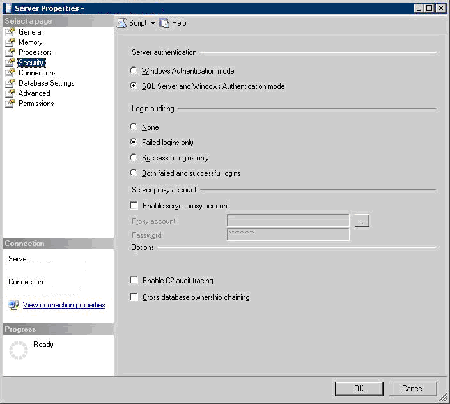
To confirm this setting
- In SQL Server Management Studio Express, right-click the Database root and select Properties from the pop-up menu.
The Server Properties dialog appears.
- In the left pane, select Security.
- Confirm that SQL Server and Windows Authentication mode option in the Server Authentication section is selected.
- If this option is not enabled, select the option and click OK.
- Create HIPS Databases at the SQL level.
The information in the following sections can help you to perform these tasks.
Copyright © 2008 CA.
All rights reserved.