

|
|
|
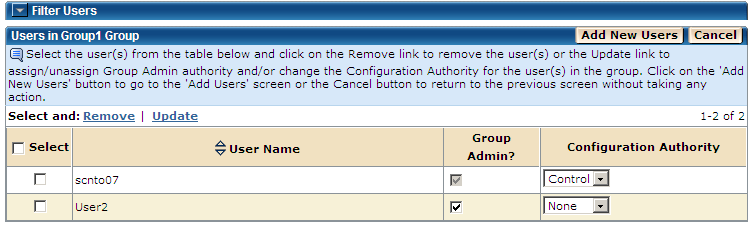
You can use the Process Groups page to update the group admin and configuration authorities for the existing users in a group.
To update user authorities in a group
The Home page appears.
The Admin page appears.
The Process Groups page appears.
The list of users assigned to the selected group is displayed.
Note: A Group Admin user cannot revoke their own group admin authority.
The configuration authority determines the user’s level of authorization to process public configuration files. The levels from low to high are defined as follows:
No configuration file processing allowed.
The actions not allowed by the user for a configuration file in the group with the authorization level of none are as follows:
Users can submit the configuration file, but no access to transfer records inside the file is allowed.
The actions not allowed by the user for a configuration file in the group with the authorization level of submit are as follows:
Users can read the transfer records in a configuration file (using the load button) and submit them for processing.
The actions not allowed by the user for a configuration file in the group with the authorization level of read are as follows:
Users can build and save transfer records in a configuration file as well as having Submit and Read authorities.
The only action not allowed by the user for a configuration file in the group with the authorization level of edit is as follows:
Means all of the above authorities as well as deleting configuration files.
Users are allowed all the actions described for the none authority.
A confirmation message is displayed on the main Process Users screen.
Note: Click Cancel on this page to cancel the process and return to the previous page.
| Copyright © 2011 CA. All rights reserved. | Tell Technical Publications how we can improve this information |