Configuring and Administering CA XCOM Management Center › Super Admin Process Users › Display Users
Display Users
You can use the Process Users page to display configured users of CA XCOM Management Center.
To display configured users
- Log in to CA XCOM Management Center.
The Home page appears.
- Click Admin.
The Admin page appears.
- Click Process Users under Super Admin Functions.
The Process Users page appears.
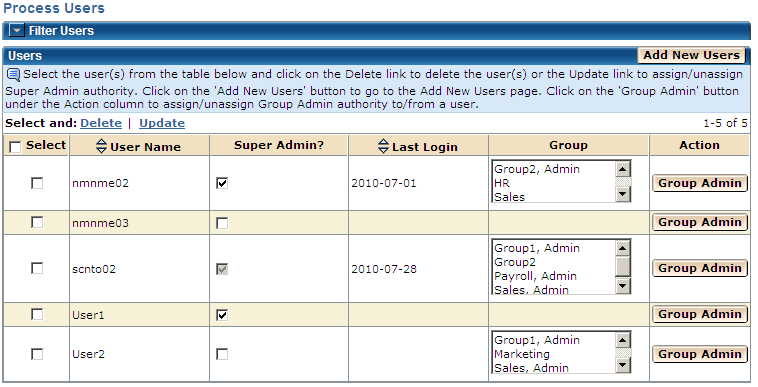
Notes:
- Users can use the filter section on the top of the Process Users page to filter the list of users based on the group they belong to, starting character of the user name, and/or the user name conflicts between users with the same name, but in different combinations of lower/upper case characters.
- When information for all configured users cannot be accommodated on a single screen, table rows are normally displayed one page at a time. Page information is shown at the top right of the table, indicating the rows presently displayed and the total number of rows. You can click the paging links in this area to display different pages.

