Previous Topic: Resubmitting a job five minutes after it fails

Next Topic: Delaying job submission until the next hour

Running a recovery job after failure

Objective

There are a number of similar jobs. When one of these jobs fails, you want to run a generic recovery Application that runs a recovery job and then completes the failed job.

Solution

To run a recovery job after failure

  1. Indicate an Alert is to be triggered when one of these jobs fails.
  2. Define the Alert. Use the following JavaScript script. This script uses the execTrigger built-in function to trigger a recovery Event, and passes the name of the failed job, the Application to which it belongs, and the generation number for that Application as user parameters, for example:
    execTrigger('cyber.recover','','','','%WOB._name','%APPL._name','%APPL._gen');
    
  3. Set up the recovery Application as follows:
    1. Define the recovery job. For the name of the job, you can use the name of the failed job followed by a qualifier of RECOVER (for example, %APPL._user1.RECOVER).
    2. Set up the recovery job to release a link. For the link, run a JavaScript script at run time that uses the execCommand built-in function to complete the failed job, for example:
      execCommand('%APPL._user1','%(APPL._user2).%APPL._user3','ACTION COMPLETE');
      

    The recovery Application looks like this:
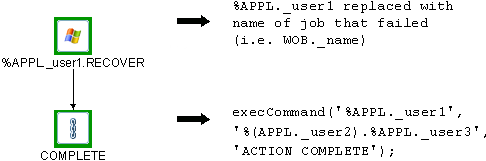
    The diagram shows the recovery Application containing the recovery job and the link.

  4. Define an Event (CYBER.RECOVER) to run the recovery Application. This Event will be triggered automatically.

Explanation

When the job fails, an Alert builds a recovery Application. This Application consists of a recovery job followed by a link that completes the failed job in the original Application.

Built-in variables for the job name, Application name, and generation number are passed to the recovery Application as user parameters. This lets you use the same generic Application for jobs requiring a similar recovery process.