

|
|
|
The EDX command invokes the issuer’s PROFILE XEDIT (if one exists) and performs the same function as the EDIT command except that it also displays and lets you edit statements from the included directory profile, if there is one. This is in addition to displaying the INCLUDE statement itself.
You also change the POSIX‑related statements: POSIXINFO, POSIXGLIST, and POSIXOPT. For syntax and usage information for the POSIXINFO, POSIXGLIST, and POSIXOPT directory control statements, see the IBM CP Planning and Administration guide for your release of VM.
If you edit the statements that come from the directory profile, the updated directory profile statements are copied to the directory entry so that the changes are local; the directory profile remains unchanged.
If you delete the INCLUDE statement from a directory entry, the EDX command inserts all statements from the directory profile in the directory entry, and the user ID no longer references the directory profile. Any changes you make to the statements that came from the directory profile are now local to this directory entry only.
Example
To edit the directory entry for user ID ERNIEP, making the statements from the directory entry’s INCLUDE statement available, enter:
vmsecure edx erniep
All statements that do not conflict are displayed as follows:
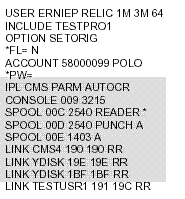
The shaded area shows the statements that come from the included directory profile; these are the only statements that differ from the example shown for the EDIT command.
Note:
| Copyright © 2011 CA. All rights reserved. | Tell Technical Publications how we can improve this information |