

|
|
|
While using CA VM:Secure or CA VM:Director, you will receive messages that do one of the following:
All messages are in the format shown in the following illustration:
Message Format
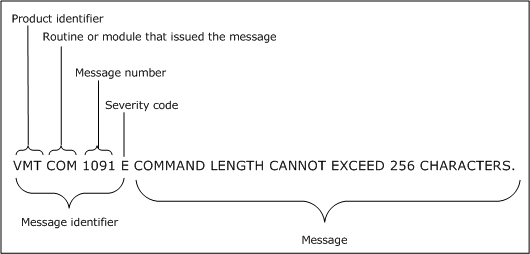
You can tell the type of message by its last letter, which is its severity code. The severity code can be one of the following:
Action message. You need to perform an action, for example, moving the cursor or entering information.
Error message. The function or task can continue normally if you correct the error. The function or task may end.
Informational message. CA VM:Secure or and initialization has completed or a task that CA VM:Secure or CA VM:Director is executing has completed. When an informational message appears immediately after a severe error message (severity code S), it tells you how to correct the problem the severe error message identified.
Response message. Requests information. You need to respond to a CA VM:Secure or CA VM:Director message.
Severe error message. An error preventing the function or task from continuing has occurred. You are returned to CMS and must restart the procedure after correcting the error.
Terminal error message. A serious internal error has occurred, preventing the CA VM:Secure or CA VM:Director service virtual machine from continuing execution.
Warning message. An abnormal condition has occurred. The function or task continues, although the results may be affected by the abnormal condition.
| Copyright © 2011 CA. All rights reserved. | Tell Technical Publications how we can improve this information |