Previous Topic: SAML 2.0 Support in Single Sign-On

Next Topic: How to Set Up SAML Authentication

How Single Sign-On Support for SAML 2.0 Works

The typical CA Performance Center authentication process using Single Sign-On differs from authentication that takes advantage of SAML support. With SAML authentication, users do not see the CA Performance Center Login page. They are instead redirected to an interface that the IdP provides. For all other supported authentication methods, Single Sign-On provides the login page.

The following diagram illustrates the SAML authentication process with Single Sign-On, CA Performance Center, and an IdP that supports the SAML standard, such as CA SiteMinder:
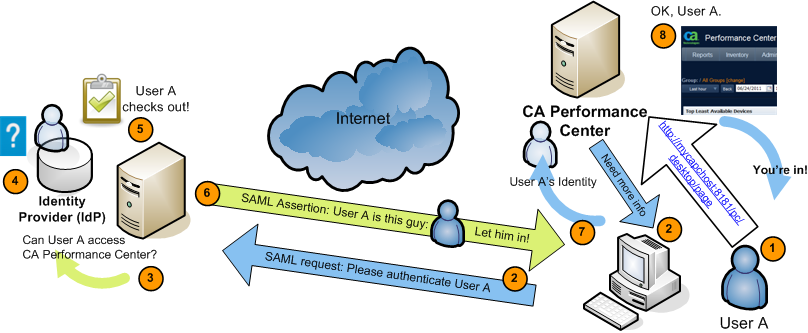
CA Performance Center can use SAML to request and receive authentication data from an IdP

The following generic process describes how CA Performance Center supports SAML authentication. Implementation-specific options, such as digitally signed certificates and transport binding, have been omitted:

  1. A user attempts to access CA Performance Center, by navigating to http://mycapchost:8181/pc/desktop/page, for example.
  2. CA Performance Center responds with a SAML request for authentication from the Identity Provider (IdP).
  3. The browser processes the request and contacts the authentication software running on the IdP server.
  4. The IdP determines whether the user has an existing logon security context—whether the user is already logged on.
  5. If the user is not logged on, the IdP authenticates the user with an implementation-specific method.

    For example, the IdP might interact with the browser to challenge the user to provide credentials. This stage of the authentication is irrelevant to CA Single Sign-On.

  6. The IdP builds and sends a SAML assertion representing the user’s logon security context to the browser.
  7. The browser sends the SAML assertion to CA Performance Center.
  8. CA Performance Center obtains the assertion and processes it.
  9. If the assertion is valid, CA Performance Center establishes a session for the user. The browser redirects to the target page, the Home dashboard page for the user.