

|
|
|
In this example there are multiple parameter option selections. The “from” date and time, “to” date and time and “USEBLOCKTIME” options are specified.
//JOBNAME  JOB
//BESLOGRX EXEC PGM=TBELOGRX,
//         PARM=(’FROM(2010/001,08:00), TO(2010/001,20:00)’,
//         ‘USEBLOCKTIME’)
//STEPLIB DD DISP=SHR,DSN=@LIBPFX.CTAPLINK
//SYSPRINT DD SYSOUT=*
//SYSUT1   DD DISP=SHR,DSN=@LOGPFX.@SRCDSN,
//         DCB=(RECFM=U,BLKSIZE=24576)
//SYSUT2   DD DISP=(,CATLG),
//         DSN=@CPYPFX.@CPYDSN,
//         DCB=(RECFM=U,BLKSIZE=24576),
//         UNIT=@DUNIT,SPACE=(CYL,(100,50),RLSE),
//         VOL=SER=@DVOL
/*
In this example the SYSUT1 DD points to the BES log stream and only the REPORTONLY option is specified. The date and time range is already specified for the system logger in the SUBSYS parameter.
//JOBNAME  JOB
//BESLOGRX EXEC PGM=TBELOGRX,
//         PARM=’REPORTONLY’
//STEPLIB DD DISP=SHR,DSN=@LIBPFX.CTAPLINK
//SYSPRINT DD SYSOUT=*
//SYSUT1   DD DISP=SHR,DSN=@LOGPFX.@SRCDSN,
//         DCB=(RECFM=U,BLKSIZE=24576),
//         SUBSYS=(LOGR,,
//         'FROM=(2006/172,00:01),TO=(2010/365,23:59)')
//SYSUT2   DD DISP=(,CATLG),
//         DSN=@CPYPFX.@CPYDSN,
//         DCB=(RECFM=U,BLKSIZE=24576),
//         UNIT=@DUNIT,SPACE=(CYL,(100,50),RLSE),
//         VOL=SER=@DVOL
/*
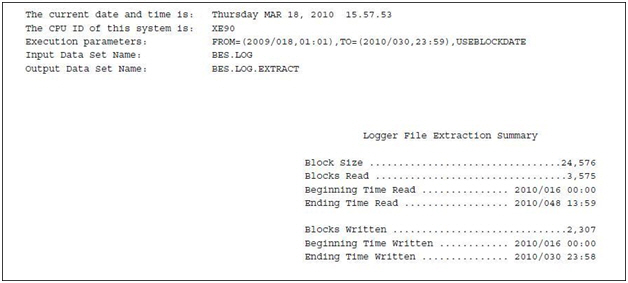
This sample shows a report generated with the following settings:
| Copyright © 2011 CA. All rights reserved. | Tell Technical Publications how we can improve this information |