

|
|
|
SiteMinder provides configurable response attributes as a means of delivering data to applications and customizing the user experience.
You configure responses using the Policy Server User Interface, and then associate them with a specific consumer. When the Policy Server sends an assertion to the SAML Affiliate Agent, it includes the response data. The SAML Affiliate Agent interprets the information and makes it available to Web applications.
The following illustration shows how responses personalize content.
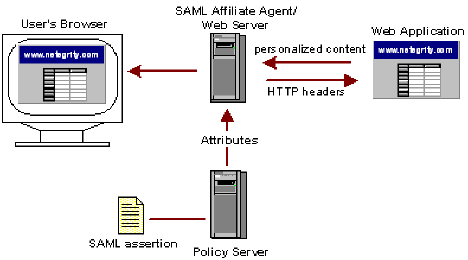
The following table lists the SAML Affiliate Agent response attributes.
|
Affiliate Attribute Name |
Description |
|---|---|
|
Affiliate-HTTP-Cookie-Variable |
Generates a SetCookie header, which then sets a non-persistent cookie in a Web browser. The cookies only exist in the cookie domain where the SAML Affiliate Agent is configured. You can enter multiple Affiliate-HTTP-Cookie-Variable attributes. |
|
Affiliate-HTTP-Header Variable |
Allows you to specify an arbitrary dynamic name/value pair for use by a Web application. You can enter multiple Affiliate-HTTP-Header-Variable attributes. |
The HTTP-Header-Variable and HTTP-Cookie-Variable attributes enable a SAML Affiliate Agent to pass a static or dynamic list of name/value pairs to a Web application. The name/value pairs are specific to the user requesting a resource, which enables the application to customize what the user sees.
For example, an administrator configures the Affiliate-HTTP-Header-Variable response attribute to store the full name of the user. When the user is authorized to access the protected resource, the SAML Affiliate Agent passes the user’s full name to the Web application. The user’s name is then displayed by the application, which helps to establish a relationship with the customer.
Be aware that in a Web application environment, the HTTP-Header-Variable response attribute appears as an HTTP_attribute_name variable, where attribute_name is the name of the HTTP variable, for example USERFULLNAME. You do not have to have an underscore in the name as the underscores cause problems with some application servers.
Note: The server may convert any dash (-) in the attribute name to an underscore (_), and all alphabetic characters to uppercase.
| Copyright © 2011 CA. All rights reserved. | Email CA Technologies about this topic |