

|
|
|
The following example describes the steps taken to collect users’ favorite drinks and add that information to their profiles:
The modified object class attribute is:
OBJECTCLASS=objectclass,top,person,organizationalperson,inetorgperson,newpilotperson
newpilotperson is an object class that is provided with iPlanet Directory Server. One of the attributes contained in this object class is drink, which is used to store a user’s favorite beverage.
|
Properties File |
Entry |
|---|---|
|
user.properties object properties file |
DRINK_ID=drink |
|
user.properties presentation properties file |
DRINK_ID=Admin:R,OrgAdmin:R |
|
dms_en_US.properties locale properties file |
DRINK_ID=Favorite Drink |
<%
bVisible = accessProperties.getVisible(role, "DRINK_ID");
if (bVisible==true) { %>
<tr>
<td align="left">
<jsp:setProperty name="localebean" property="key"
value="DRINK_ID" />
<font size=-1 face="arial,helvetica" >
<jsp:getProperty name="localebean"
property="label"/></font>
</td>
<tr>
<td>
<%
String drinkValue = properties.getValue("DRINK_ID");
if ( drinkValue != null ) {
%>
<td><input type="text" size="42" maxlength="40"
name="DRINK_ID" value= "<%= drinkValue %>">
</td>
<% } else { %>
<td><input type="text" size="42" maxlength="40"
name="DRINK_ID">
</td>
<% } %>
<td><input type="hidden" size="42" maxlength="40"
name="INFO_DRINK_ID">
</td>
</tr>
<% } %>
<%
    // Collect all attributes that will be checked for empty values
    Vector listOfIds = new Vector();
    /**
    listOfIds.add("PASSWORD_ID"); //never remove password!!
    **/
    listOfIds.add("DRINK_ID");
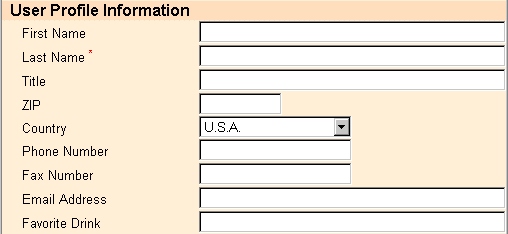
The rendered HTML form resembles the following:
| Copyright © 2011 CA. All rights reserved. | Email CA Technologies about this topic |