

|
|
|
The Condition group box is where you create conditions to add to the policy expression.
Specifies the variable name for the policy expression condition. Type a value, or click the search icon to select a variable object using the Variable Lookup Dialog.
Specifies the operator for the expression condition. Selections include:
Indicates that the variable specified in the first portion of the condition must equal the value in the second portion of the condition.
Indicates that the variable specified in the first portion of the condition must be greater than the value in the second portion of the condition.
Indicates that the variable specified in the first portion of the condition must less than the value in the second portion of the condition.
Indicates that the variable specified in the first portion of the condition greater than or equal to the value in the second portion of the condition.
Indicates that the variable specified in the first portion of the condition must less than or equal to the value in the second portion of the condition.
Indicates that the variable specified in the first portion of the condition must have a null value.
Specifies a value for the policy expression condition. Type a value, or click the search icon to select an existing variable object using the Variable Lookup Dialog.
Note: When entering a string value, the string must be contained in quotes.
Adds the condition to the Expression list in the Infix Notation group box.
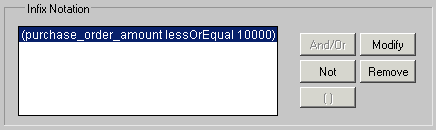
For example, if you enter the following condition and click Add,

The following appears in the Infix Notation group box:
| Copyright © 2011 CA. All rights reserved. | Email CA Technologies about this topic |