

|
|
|
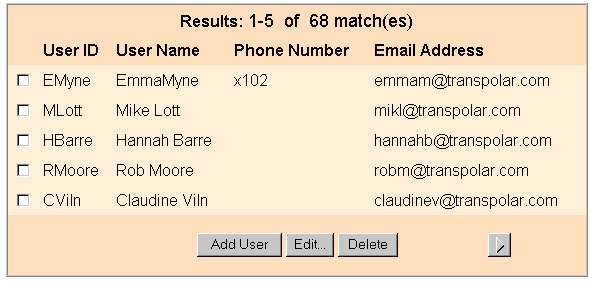
By default, Registration Services displays the results of a search query at the bottom of the search page. You can modify where Registration Services displays the search results by changing manage_data.jsp.
The following statements tell Registration Services to display the search results at the bottom of the search page:
<%
    if( action.equalsIgnoreCase("INITSEARCH")||
                           action.equalsIgnoreCase( "DOSEARCH" ) ||
action.equalsIgnoreCase("DELETE") ||
action.equalsIgnoreCase("JOIN") ||
                           action.equalsIgnoreCase("DISJOIN") ||
action.equalsIgnoreCase("GET_SEARCH_OBJECT_ATTRS")
        ) { %>
To display search results in a different page, comment out the all of the statements in the code above except the first statement. To comment out these lines, add two forward slashes (//) to the beginning of each line and after ("INITSEARCH"), as shown:
<%
    if( action.equalsIgnoreCase("INITSEARCH") //||
        //action.equalsIgnoreCase( "DOSEARCH" ) ||
        //action.equalsIgnoreCase("DELETE") ||
        //action.equalsIgnoreCase("JOIN") ||
                                   action.equalsIgnoreCase("DISJOIN") ||
        //action.equalsIgnoreCase("GET_SEARCH_OBJECT_ATTRS")
        ) { %>
Note: The changes to this section of code are indicated with bold text.
The resulting search page resembles the following:
| Copyright © 2011 CA. All rights reserved. | Email CA Technologies about this topic |