

|
|
|
eTelligent Rules makes available a set of variables for use in policy expressions. To use eTelligent rules, you must also purchase and install the Web Agent Option Pack. For information on installing the Option Pack, see the Policy Server and Web Agent Option Pack Guide.
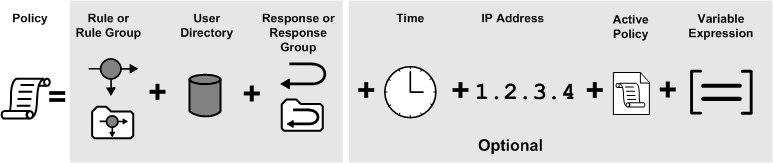
Variable expressions extend policies to include dynamic information evaluated at runtime. Expressions can be added to policies that make use of variable objects. Variable objects may be used in expressions to create a boolean set of conditions that determines entitlements for the resources protected by the policy.
To use variable objects in an active expression within a policy, you must configure a policy object and build the appropriate boolean expression using the SiteMinder Policy Expression dialog. The interface is similar to the LDAP Expression editor described in Add LDAP Expressions to Policies.
Note: Expressions may be added in addition to all other data supported by policy objects as shown in the following figure.
| Copyright © 2011 CA. All rights reserved. | Email CA Technologies about this topic |