

|
|
|
The resources protected by SiteMinder are identified by the following:
[Agent] [Realm Resource Filter] [Rule Resource]
An Agent monitors a server that contains one or more realms of protected resources.
A string, such as a relative path to a directory, that specifies the resources covered by the realm. If the realm is a top-level realm, specify the resources relative to the server that serves up the files or application. If the realm is nested, specify the resources relative to the parent realm.
For example, the realm might cover the contents of a directory that is immediately below the document root of a Web server, such as:
<document_root>/HR
Here, you could specify the realm resource filter as:
/HR
A string or regular expression that specifies the resources to which the rule applies. Specify the resources relative to the realm containing the resource. For example, if the realm resource filter ends with a directory name, the rule resource might include a subdirectory of the realm directory and even the name of a file in that subdirectory, such as:
/Managers/PayRanges.html
You can use wildcards to broaden the specification of a rule. For example:
/Managers/*
Combining the three elements, suppose that:
<document_root>/HR
For the Policy Server, the following figure shows the effective resource.

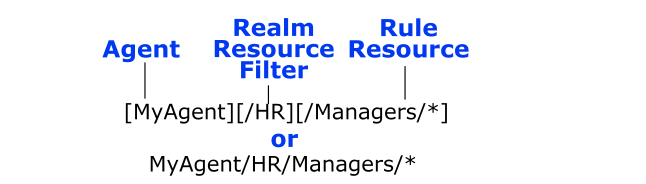
You could configure the directory called Managers as a nested realm under the /HR realm.
To access the protected page PayRanges.html, under the Managers subdirectory, a user would need to:
http://MyHost.myorg.org/HR/Managers/PayRanges.html
| Copyright © 2011 CA. All rights reserved. | Email CA Technologies about this topic |