Policy Server Guides › Policy Design Guide › Authentication Schemes › HTML Forms Authentication Schemes
HTML Forms Authentication Schemes
HTML Forms authentication schemes provide a method for authentication based on credentials gathered in a custom HTML form. This flexible means of credential collection allows you to:
- Provide a “branded” look, perhaps including a company logo.
- Substitute custom labels for user name and password collection (for example, if users think in terms of an account number and a PIN rather than a name and password).
- Provide authentication based on credentials other than a user name and password (via user directory attributes). In this case, an authentication scheme library on the Policy Server machine maps the user’s data to a DN. By mapping the user to a DN, the Policy Server can match an attribute list to the appropriate values in a user directory. This process is called back-end mapping.
- Provide authentication based on credentials that include user attributes in addition to the user name and password. This is considered additional attribute verification. A custom authentication scheme library is not required for additional attribute verification.
For example, a custom form can be used to collect a name and a secret phrase for users who forget their password.
- Provide multiple HTML forms for login, logout, forgotten passwords, etc.
Note: HTML Forms authentication schemes are supported with multi-byte characters.
Multiple Forms-based Authentication Schemes can be configured in a Policy Server installation. Each scheme consists of the following components:
- Forms Credential Collector (FCC)
-
The FCC process files are composed in a simple mark-up language that includes HTML and some custom notation.
Each HTML Forms scheme must have its own .fcc file. This file contains the custom form definition and additional information that the FCC uses to process HTML Forms authentication. The FCC extracts credentials that a user enters in the custom form generated from the .fcc file.
For the HTML Forms authentication scheme, the default extension for .fcc files is.fcc. If you want to use a different extension:
- For Apache or Oracle iPlanet web servers, configure your web server to use that extension.
- For Domino or IIS Web servers, specify that extension in the FCCCExtensions parameter of your Web Agent configuration file or object. For more information on Web Agent configuration parameters, see the SiteMinder Web Agent Guide.
- .unauth file
-
SiteMinder displays the contents of this file to users who exceed the maximum number of failed authentication attempts specified by the authentication scheme. A .unauth file should exist for each .fcc file. For example, if you have a login.fcc file on a Web server, you should also have a login.unauth file in the same location.
If an smerrorpage variable has been defined in the .fcc file, the .unauth file is not required.
- Authentication Scheme Library
-
This is a shared library that runs on the Policy Server machine and performs authentications.
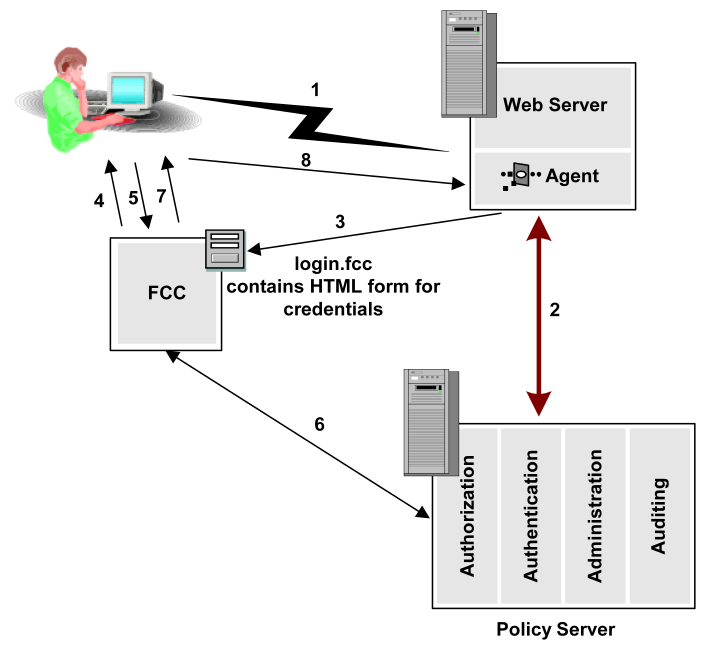
The previous diagram describes the process for HTML Forms authentication.
- A user requests a resource contained in a realm protected by HTML Forms authentication.
- The Web Agent contacts the Policy Server and determines that the user’s request must be redirected to the credential collector.
- The Web Agent redirects the request to the URL of the credential collector file.
- The credential collector displays the form described in the .fcc file in the user’s browser.
- The user fills out the custom form and Posts (submits) the form. The credential collector processes the credentials.
- The credential collector (FCC) logs the user into the Policy Server. The Policy Server returns user session data to the credential collector.
- If the user is authenticated, the credential collector creates a session cookie, passes the session cookie to the browser and redirects the user to the resource that he or she originally requested.
- The user uses the session cookie to authenticate. Then, the Web Agent handles user authorization.
More information:
SiteMinder FCC Files

