

|
|
|
Access roles enable centralized management of user privileges in external applications secured by SiteMinder. Identity Manager administrators can create and assign roles in Identity Manager that determine users’ access to applications outside of Identity Manager. For example, a Role Administrator may create roles in Identity Manager that control access to a finance application, and grant the ability to assign the roles to the Help Desk administrator. The Help Desk administrator can assign or revoke that role through the Identity Manager interface.
Access roles are enabled through integration with SiteMinder. SiteMinder associates roles with policies to determine which users can access a protected resource and to deliver user-specific role and task information to protected resources.
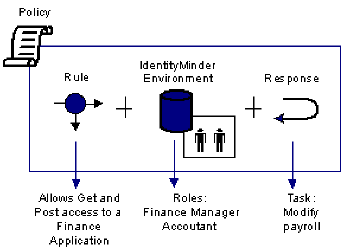
To configure roles-based access control to protected resources, a SiteMinder administrator associates an Identity Manager Environment with a Policy Domain in the Policy Server User Interface. The administrator creates a policy to protect an application and associates a role or roles with that policy. Users who have an associated role can access the protected application.
SiteMinder can also provide details about entitlements that a user has in protected applications. To provide entitlement information to an application, a SiteMinder administrator associates a response with an access rule in the application’s policy (see the following figure).
The response contains a response attribute that specifies a SiteMinder-generated user attribute. The SiteMinder-generated user attribute retrieves task information from Identity Manager. The Policy Server passes this information to the Web Agent as an HTTP header variable or a cookie. The Web Agent makes the header variable or cookie available to the protected application for fine-grained access control.
| Copyright © 2011 CA. All rights reserved. | Email CA Technologies about this topic |