

|
|
|
In SiteMinder 6.0, the Policy Server does not install a Crystal Reports Server as with previous SiteMinder 5.x and 4.x versions. However, the Policy Server still generates audit logs and stores the necessary reporting information in a SQL Server or Oracle database. The Policy Server 6.0 installation program installs sample reports files (.rpt) that are compatible with Crystal Reports 9.0.
Note: These sample files are provided so that customers can continue to use Crystal Reports to read reporting data from the Policy Server's audit logging database. However, CA does not provide support for using the sample files.
The following figure shows a sample Crystal Reports 9.0 and Policy Server environment:
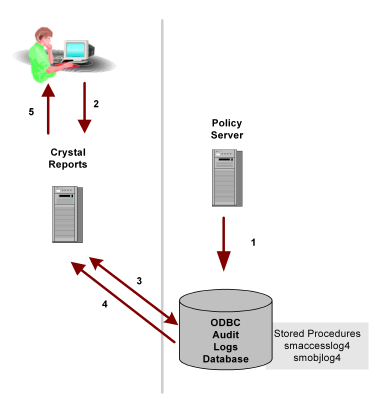
In the above figure, the Policy Server resides on either a UNIX or Windows platform, with a database for audit logs. Crystal Reports resides on a Windows platform, and is configured to communicate with the audit logs database.
The following steps describe the events that occur in a Crystal Reports and Policy Server environment when a user requests a report:
| Copyright © 2011 CA. All rights reserved. | Email CA Technologies about this topic |