Installation and Upgrade Guides › SiteMinder Upgrade Guide › Planning Migration and Upgrades › Upgrade 5.x to a 6.x Policy Server Clustered Environment
Upgrade 5.x to a 6.x Policy Server Clustered Environment
SiteMinder 6.x introduces the concept of Policy Server clusters to provide for increased availability and ease of configuration. Once clusters are defined, an Agent can transparently fail over from one cluster of Policy Servers to another, when pre-configured failover criteria are met. Dynamic Agent to Policy Server load balancing provides for maximum system throughput, at the same time allowing for Policy Server clusters to be assembled from a heterogeneous mix of system hardware. After upgrading from 5.x to 6.x, the Policy Server supports both non-clustered and clustered environments.
The following are general instructions on how to migrate from a non-clustered 5.x Policy Server set up to a 6.x clustered deployment. The following figure illustrates these instructions:
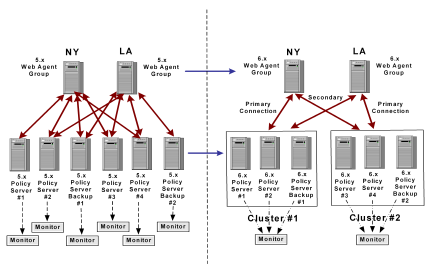
- Define clusters based on:
- Capacity planning by using your existing throughput (transactions per seconds) requirements. For example, if you require a Policy Server environment that can handle 200 transactions per second, you need two Policy Servers that can maintain 100 transactions per second each. For more information about Policy Server performance, see the "SiteMinder Performance Planning and Tuning" white paper available at the Technical Support site.
- Proximity to Agents and have the primary cluster closest to the corresponding group of Agents. For example, as noted in the latter figure, you could have Agent groups in two separate geographical locations; one could be in New York and the other in Los Angeles. Then, you need to have Policy Server Cluster #1 closest to the New York Agent group and Cluster #2 near the one in Los Angeles.
- Define redundancy (number of Policy Servers in a cluster) requirements by:
- Making sure that the cluster can hold the planned load with network and system failures.
- Having at least one backup policy server in a cluster. For example, as noted in the latter figure, if you have 2 Policy Servers, you need a third one to handle the load if one of the others fail.
- Define backup clusters by:
- Planning for primary cluster failure. Make sure that the planned load works when the primary cluster fails or becomes unresponsive.
- Defining at least one backup cluster. Make sure that at least one backup cluster is defined to maintain the load if the primary cluster fails.
- Upgrade and migrate the 5.x environment to 6.x.
- Create the Policy Server clusters in the 6.x environment by following the instructions in the Policy Server Management guide.
- Configure the OneView Monitor as a centralized monitor for other Policy Servers in a cluster, as noted in the latter figure. In 5.x, each Policy Server had one OneView Monitor; in 6.x, you can have one centralized OneView Monitor per Policy Server cluster.
Note: For more information, see the "Clustering Policy Servers" chapter in the Policy Server Management guide.
More information:
Upgrade a 5.x Policy Store

