Policy Server Guides › Policy Server Management Guide › Using the Policy Server as a RADIUS Server › How to Authenticate Users in a Homogeneous RADIUS Environment
How to Authenticate Users in a Homogeneous RADIUS Environment
A homogeneous RADIUS environment is the most simple to protect. You can protect the RADIUS device using just one policy. This type of environment includes only one RADIUS device, such as a Cisco RAS, and one user directory, as shown in the following graphic:
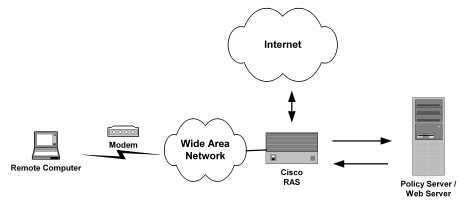
To setup SiteMinder in a homogeneous RADIUS environment
- Configure the system:
- Define the RADIUS Agent, as explained in Define the RADIUS Agent.
- Setup a user directory against which to authenticate RADIUS users, as explained in Set Up the User Directory
- Optionally, you can also define administrative users and modify the authentication schemes.
- Configure the policy domain:
- Create a RADIUS authentication scheme (CHAP or PAP), as explained in Create the Authentication Scheme.
- Define a realm that identifies the RADIUS Agent and the RADIUS authentication scheme, as explained in Define the Realm.
- Define a rule that enables authenticated users to access the realm protected by the RADIUS Agent, as explained in Define the Rule.
- Define a response that provides the user profile to the NAS device and configures the characteristics of the session using response attributes, as explained in Define the Response.
- Create a policy that binds the rule and response with the user directory, as explained in Create the Policy.
More information:
How RADIUS Authentication Works with the Policy Server

