Create a ticket from the menu.
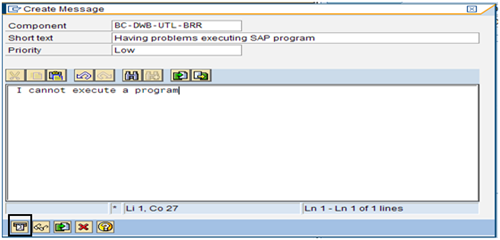
The Create Message page appears.
- Enter a short text description.
- Select a priority for the ticket.
- Enter a long text description.
A message confirms that the ticket was created and assigns a request number.
If you want SAP Solution Manager to control the ticket lifecycle, create CA Service Desk Manager tickets using the Help menu in SAP Solution Manager. Tickets (such as incidents) initiated in SAP synchronize with CA Service Desk Manager, providing a single repository for all incidents in your support environment.
To create a ticket in SAP
Create a ticket from the menu.
The Create Message page appears.
A message confirms that the ticket was created and assigns a request number.
| Copyright © 2010 CA. All rights reserved. | Email CA about this topic |