

|
|
|
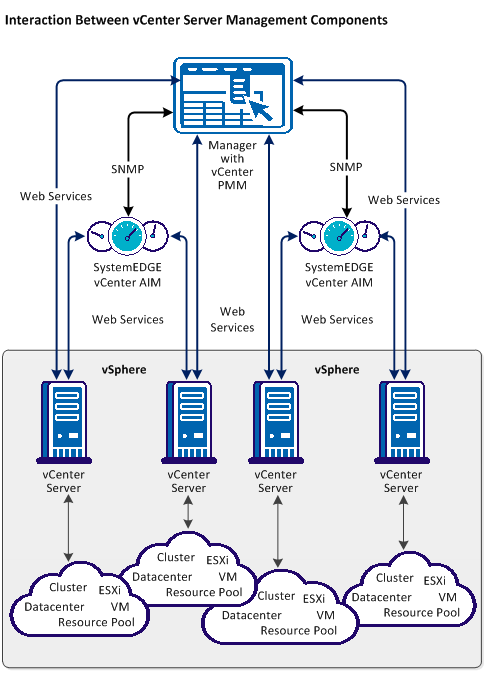
The following diagram illustrates how the components involved in vCenter Server management interact. SystemEDGE and the vCenter Server AIM run on a Windows server. The AIM communicates with one or more remote vCenter Servers to manage the virtual environment. The vCenter Server AIM collects the data for an entire view of the physical and virtual resources associated with the vCenter Server.
You can configure vCenter Server management during installation or through the Administration tab of the user interface.
Note: VMware Tools optimize the virtualization of VMs and it is recommended that they are installed on each VM in your VMware environment. Some features of this product are not available or do not function correctly for VMs that do not have VMware Tools installed. For this reason, VMs that do not have VMware tools installed are not supported.
| Copyright © 2011 CA. All rights reserved. | Tell Technical Publications how we can improve this information |