

|
|
|
You can implement the functionality of CA SYSVIEW CONDITION selection processing under GMI. The following two fields appear on the objects that contain fields (:R-Stg field) with statuses:
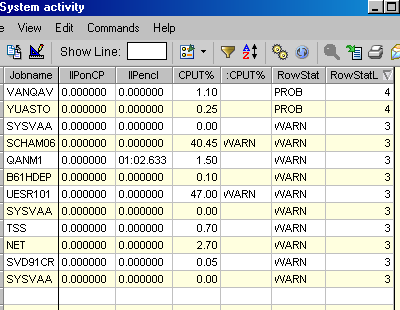
Displays in character format the highest level status for all fields in a row. The status can contain one of the five values previously listed. This field is great for displaying the row level status but does not sort well.
Displays a numeric representation of the highest status for the row. This field can be used with the GMI filter function to filter on the numeric row level status. For example: RowStatLvl >= 3 displays only status levels of 3 and 4, RowStatLvl =4 displays only rows with a status value of 4.
Status Values are as follows:
You can use the RowStatLvl field to sort the row status with descending status, so that all of your highest severity rows display first.
Example: RowStat and RowStatLvl
| Copyright © 2012 CA. All rights reserved. | Tell Technical Publications how we can improve this information |