

|
|
|
The following diagram illustrates a sample SOA Security Manager installation and lists the order in which you install and configure each component.
Note: The FSS Administrative UI is installed with the Policy Server. Unless you need to generate WS-Security SAML assertion tokens, you may safely leave the CA SiteMinder Federation Security Services on the Policy Server machine without registering it with the Policy Server.
Note: The following figure depicts a single policy/key store instance. Although not illustrated, your environment may use separate instances for individual policy and key stores.
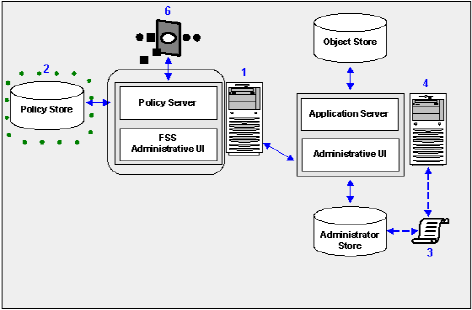
The following sections in the documentation detail how to:
Note: If you are trying to configure or upgrade a SOA Security Manager store listed in the SOA Security Manager Platform Support Matrix and cannot find the procedures in this guide, see the Directory Configuration Guide.
| Copyright © 2009 CA. All rights reserved. | Email CA about this topic |