Installation Guides › Upgrade Guide › Using FIPS-Compliant Algorithms › Migration Roadmap—Configure FIPS-Only Mode
Migration Roadmap—Configure FIPS-Only Mode
The following diagram illustrates a sample r12.1 SP3 environment operating in FIPS-migration mode and lists the order in which you configure each component and connection to operate in FIPS-only mode.
The shaded components represent sensitive data that must be re-encrypted using FIPS-approved algorithms. Do not continue with the migration process until you have:
- Re-encrypted the policy store key for each Policy Server in the environment
- Re-encrypted the policy store administrator password
- Re-encrypted the SOA Security Manager Super User password
- Re-encrypted the shared secret for each Agent in the environment
- Re-encrypted the policy store data
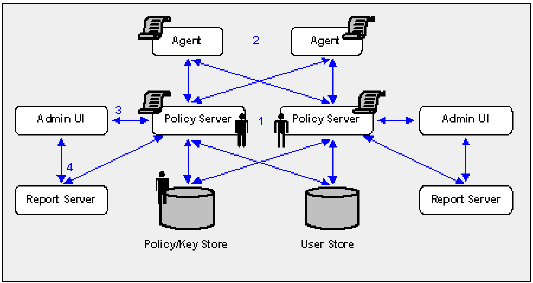
- Each Policy Server in the environment is set to operate in FIPS-only mode.
- Each SOA Agent, including custom Agents, is set to operate in FIPS-only mode.
- The existing connection between each Administrative UI and its respective Policy Server is encrypted using algorithms that are not FIPS compliant. Re-register each Administrative UI with its respective Policy Server to encrypt the connection using FIPS-compliant algorithms.
- The existing connection between a Report Server and a Policy Server is encrypted using algorithms that are not FIPS compliant. Re-register each Report Server with its respective Policy Server to encrypt the connection using FIPS-compliant algorithms.

