Installation Guides › Policy Server Installation Guide › Installing Reports › How the Reports Installation Works
How the Reports Installation Works
The SOA Security Manager reporting feature requires that you install and configure a Report Server, a report database, and a SOA Security Manager audit database to manage SOA Security Manager policy analysis and audit-based reports. The following diagram details a sample SOA Security Manager environment and lists the order in which each component is installed or configured:
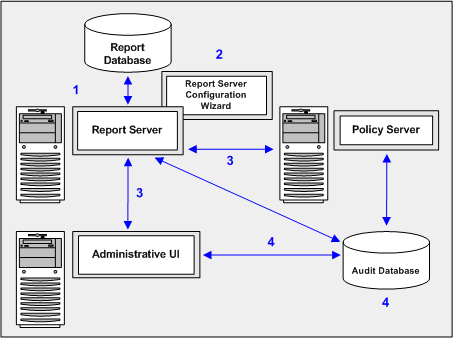
The following list explains each of the illustrated steps:
- Install the Report Server—Installing the Report Sever is the first step in the process. You configure a report database during the installation.
- Install the SOA Security Manager report templates—Installing the SOA Security Manager report templates is the second step in the process. The SOA Security Manager Report Server Configuration Wizard configures the Report Server to use a set of SOA Security Manager policy analysis and auditing report templates.
- Register the Report Server—Registering the Report Server is the third step in the process. Registration requires that you configure a connection between:
- The Report Server and a Policy Server
- The Report Server and the Administrative UI
- Configure a SOA Security Manager audit database—Configuring a SOA Security Manager audit database is the fourth step in the process. A separate SOA Security Manager audit database, which is registered with the Administrative UI, is required to run audit-based reports.

