

|
|
|
To enable Federation Web Services (FWS) for a SOA Security Manager/WebLogic configuration, deploy the FWS application.
The following illustration shows a SOA Security Manager and WebLogic sample configuration. The illustration provides an example of how to use FWS in a sample federated environment.
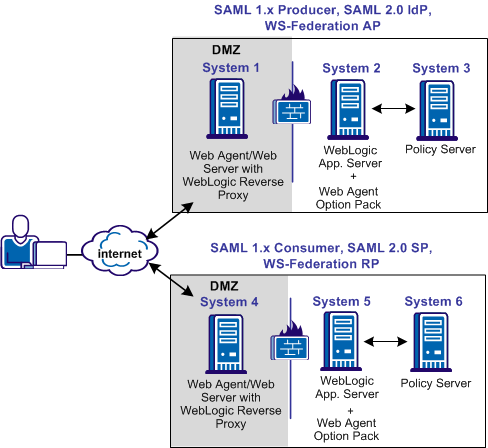
In this environment, deploy the FWS application on System 2 and System 5.
Important! Complete the deployment procedure for the Web Agent at the asserting party and the relying party.
After installing the software components on the systems in the illustration, deploy the FWS application. Deploy the application on System 2 for the asserting party and on System 5 for the relying party.
To deply the FWS application
Important! For the FWS application to work with WebLogic Server 8.1.4 or higher, review the weblogic.xml file in the WEB-INF directory. Verify that the prefer-web-inf-classes parameter is set to true. The weblogic.xml file is located in the following directory:
webagent\affwebservices\WEB-INF
The following code excerpt shows how to set the prefer-web-inf-classes parameter:
  <weblogic-web-app>
  <container-descriptor>
    <prefer-web-inf-classes>true</prefer-web-inf-classes>
  </container-descriptor>
</weblogic-web-app>
If prefer-web-inf-classes is set to false, change the value to true.
| Copyright © 2011 CA. All rights reserved. | Email CA Technologies about this topic |