Configuration Guides › Federation Security Services Guide › Federation Security Services Overview › Solutions for Federation Use Cases › Solution 13: SAML 2.0 SSO with Dynamic Account Linking at the SP
Solution 13: SAML 2.0 SSO with Dynamic Account Linking at the SP
Solution 13 shows how SiteMinder Federation Security Services can be deployed at IdPA.com and SPB.com to solve Use Case 13.
Note: Dynamic account linking is only supported with SAML 2.0.
SiteMinder is deployed at both sites by installing the Web Agent with the Web Agent Option pack on one system, and the Policy Server on another system.
The following illustration shows single sign-on with dynamic account linking at the Service Provider.
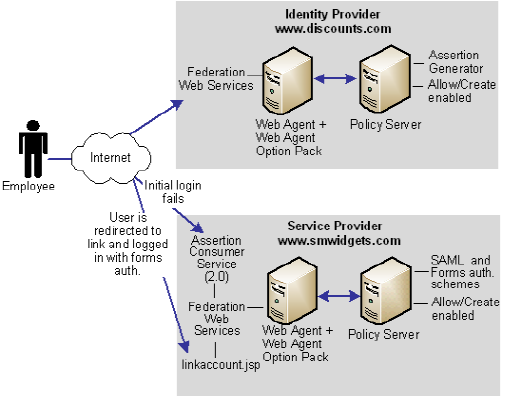
Note: The SPS federation gateway can replace the Web Agent and Web Agent Option Pack to provide the SiteMinder Federation Web Services application functions. For information about installing and configuring the SPS federation gateway, see the CA SiteMinder Secure Proxy Server Administration Guide.
The order of events for this solution is as follows
- The employee initially logs in and authenticates at discounts.com. Discounts.com creates an assertion for the employee and posts the assertion (for POST binding). or redirects the user with an artifact (for artifact binding) to the Assertion Consumer Service at smwidgets.com. This assertion includes an attribute named buyerID.
- The AssertionConsumer Service at smwidgets.com tries to authenticate the user with the SAML authentication scheme, but the buyerID attribute of the employee does not map to a local user record. So the authentication fails.
- As part of the SAML authentication scheme at the SP, a redirect URL is defined, which points to the directory web_agent_home/affwebservices/linkaccount.jsp. The employee is redirected to this URL.
Note: The linkaccount.jsp file must be part of a protected realm. The default location is for this file is http://sp_home/affwebservices/public/. Copy the file from this location to a protected realm.
- A Web Agent that authenticates the local user with the forms authentication scheme protects this linkaccount.jsp URL. After a successful authentication, a SiteMinder session at smwidgets.com is established and an SMSESSION cookie is placed in the browser of the employee.
- The linkacount.jsp gets loaded in the browser and the user sees a message to permit the link to the SP account. Click on the button to permit. the account linking.
- The user is redirected to the Assertion Consumer Service, where the browser of the employee presents the SMSESSION cookie with the assertion to the Assertion Consumer Service.
- The Assertion Consumer Service extracts the NameID from the assertion and inserts this value into a newly created buyerID attribute in the existing user record of the employee. The Assertion Consumer Service knows which user record to map because the UserDN in the SMSESSION cookie identifies the user.
The Search Specification that is configured in the SAML 2.0 authentication scheme indicates which attribute is mapped to the NameID. In this case, the Search Specification is buyerID=%s.
- After the attribute of the user is mapped, the SAML authentication scheme authenticates the user based on the assertion and establishes a new user session.
The next time the same user presents an assertion with the buyer ID, the mapping works and the user successfully gains access to the requested resource.

