Configuration Guides › Federation Security Services Guide › Federation Security Services Overview › Solutions for Federation Use Cases › Solution 6: WS-Federation Signout
Solution 6: WS-Federation Signout
Solution 6 illustrates how SiteMinder Federation Security Services can be employed to solve Use Case 6: WS-Federation Signout.
In this solution:
- smcompany.com is the Account Partner
- ahealthco.com is the Resource Partner that initiates the signout request.
WS-Federation signout is enabled using the FSS Administrative UI at the Account Partner and the Resource Partner.
The following figure illustrates WS-Federation sign-out.
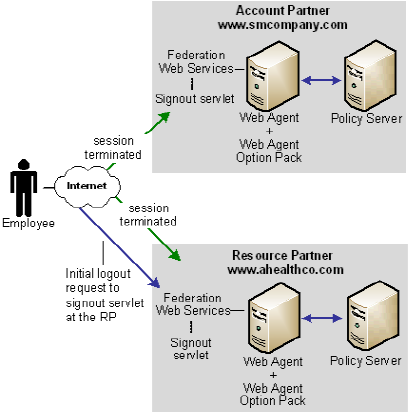
Note: The SPS federation gateway can replace the Web Agent and Web Agent Option Pack to provide the SiteMinder Federation Web Services application functions. For information about installing and configuring the SPS federation gateway, see the CA SiteMinder Secure Proxy Server Administration Guide.
The sequence of events is as follows:
- An employee performs single sign-on between smcompany.com and ahealthco.com. As a result, smcompany.com places information about ahealthco.com in its session server. Ahealthco.com places information about smcompany.com in its session server.
- The employee gets the details of the health benefits and clicks a logout link at the Account Partner, which calls the signout servlet at the Account Partner.
- The session of the user is terminated from the session store of the Account Partner. All references to Resource Partners for that user are also removed from the session store.
- The Account Provider retrieves a SignoutConfirm JSP page, which includes a Signout Cleanup URLs for each Resource Partner.
The SignoutConfirm page generates a frame-based HTML page with each frame containing a signoutcleanup URL for each Resource Partner associated with the user session.
- The browser of the user then accesses the signout Cleanup URL at ahealthco.com and the session of the user is removed from the session store.
- The browser of the user is finally sent back to the Account Partner.
Steps 4-6 are repeated for each Resource Partner simultaneously for complete signout for that user session.

