

|
|
|
The following SOA Security Manager features require a session store to store SAML assertions and user session information:
The assertion is stored in the session store until the consumer (Producer/Identity Provider) retrieves it. A persistent session is required for this process to work.
The single use policy feature prevents assertions (POST binding) from being reused at the relying party to establish a second session. The authentication scheme stores time-based data about the assertion, known as expiry data, in the session store at the relying party. This data helps ensure that the assertion is only used one time. Although a session store is required at the relying party, a persistent session is not required.
For single logout, the status of the user session in the session store must be changed to invalidate the session. A persistent session is required at the Identity Provider and Service Provider.
For WS-Federation signout, the status of the user session in the session store must be changed to invalidate the session. A persistent session is required at the Account Partner and Resource Partner.
To implement these features across a clustered Policy Server environment, set up the environment as follows:
Persistent sessions are part of the realm configuration.
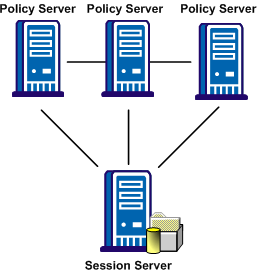
Sharing the session store verifies that all Policy Servers have access to assertions when each one receives a request for an assertion.
Sharing the session store verifies that all Policy Servers have access to user session data when each one receives a request for a session logout.
Note: All Policy Servers that generate or consume assertions or process a persistent SMSESSION cookie must be able to contact the common session store. For example, a user logs in to example.com and gets a persistent session cookie for that domain. Every Policy Server that is handling requests for example.com must be able to verify that the session is still valid.
The following illustration shows a Policy Server cluster communicating with one session server:
To share a session store, use one of the following methods:
In the Policy Server Management Console, configure the Policy Server to use the designated session server.
For instructions on replicating a database, use the documentation for your database.
| Copyright © 2011 CA. All rights reserved. | Email CA Technologies about this topic |