

|
|
|
To use a JBoss or Tomcat Application Server in a SOA Security Manager federated environment, deploy the FWS application on the application server.
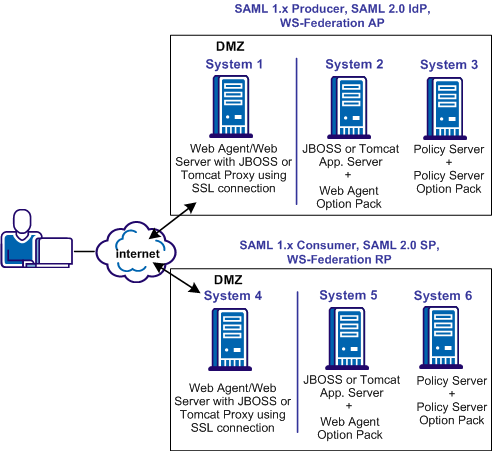
The following illustration shows the deployment with JBOSS or Tomcat. On Systems 1 and 4, the Web Agent is installed with the JBOSS or Tomcat Connector for proxy support. SSL is enabled between the proxy and the application server. On Systems 2 and 5, FWS is deployed with the application server by way of the Web Agent Option Pack.
The process for deploying FWS is as follows:
The following sections detail each step in the process.
| Copyright © 2011 CA. All rights reserved. | Email CA Technologies about this topic |